Say you run a security operations center and you want an AI copilot to help triage network traffic. The raw material is sitting right there: AWS VPC Flow Logs, a line per network connection, millions of them a day. Pasting them into a hosted large language model (an LLM, the kind of model behind Claude or ChatGPT) feels like it should just work. The problem is what a flow log line actually contains: your internal IP layout, your AWS account number, the identifiers of your network cards. Hand that to a third-party service and you have shipped a map of your private network to someone else’s computer, where it may be logged, cached, or used for training.
The obvious fix, blanking out the IP addresses, breaks the thing you wanted. Once 185.220.101.5 becomes ***, no threat-intelligence lookup can tell you it is a known Tor exit node, and no two log lines can be tied back to the same attacker. You have traded away all the analytical value to buy privacy.
The Rabbit Hole Generator handed me aws-vpc-flowlog-sanitizer this week, a small Python project built around a smarter answer to that trade: enrich the log while the real IPs are still in hand, then replace the identifiers with stable, reversible-looking-but-not tokens. The pattern is genuinely good, and it is worth understanding whether or not you ever run this particular tool. What I spent my thirty minutes on is the gap between the pattern and this implementation, because the implementation ships a decision that quietly undoes most of the privacy it promises: the whole scheme rests on one secret, and that secret is printed in the source code. A tool that is a backlog pick from a few weeks ago, so some of what follows is me catching up to a repo that has kept moving.
What is aws-vpc-flowlog-sanitizer used for in cloud log privacy?
aws-vpc-flowlog-sanitizer is an open-source, single-file Python script (standard library only, no dependencies) that turns raw AWS VPC Flow Log records into privacy-masked JSON suitable for feeding to an LLM, a SIEM (Security Information and Event Management system, the central log-analysis platform a SOC runs on), or a data lake. It reads log lines from a file or standard input, attaches context like country, network owner, and service name while the real IP is still available, then rewrites the IPs into deterministic tokens and partially redacts the AWS account and network-interface IDs before printing the result. It ships with sample data and a simulated AI analyzer so you can run the whole pipeline end to end on a laptop, with nothing cloud-connected.
The Architecture: enrich before you mask
A VPC Flow Log is AWS’s record of network connections in your virtual network. (“VPC” is Virtual Private Cloud, your isolated slice of AWS networking.) In the default version-2 format, each line is 14 space-separated fields. Here is one, straight from the sample data:
2 123456789012 eni-0a1b2c3d4e5f6789a 185.220.101.5 10.0.1.45 54123 22 6 5 260 1620000000 1620000060 REJECT OK
Read left to right, that is: format version, the 12-digit AWS account ID, the ENI (Elastic Network Interface, the virtual network card attached to an instance), source IP, destination IP, source port, destination port, protocol number (6 is TCP), packet and byte counts, start and end timestamps, the action (REJECT means a security group or network ACL blocked it), and a log status. Three of those fields are things you would not want to hand a stranger: the account ID, the ENI ID, and the real IP addresses that reveal your internal address plan.
The design bet the tool makes is about ordering. Two things have to happen to each line, and the sequence is the whole point:
- Enrich, while the raw IP is still in memory. Look
185.220.101.5up against threat-intelligence and GeoIP sources (here simulated with in-code dictionaries, standing in for services like AbuseIPDB or MaxMind) to learn it is in Germany, belongs to a Tor exit node, and carries a threat score of 95. Map the internal10.0.1.45to its subnet role (“Web-App-Tier”). Turn destination port 22 into “SSH.” - Mask, replacing the identifiers so no raw value leaves the boundary.
Do it in that order and you keep the intelligence (which needs the real IP) while discarding the IP itself. Flip the order and you have thrown away the only thing that made the lookup possible. That is the insight worth taking even if you never touch this code.
The masking step uses two different techniques, and the difference matters:
- IP addresses become deterministic pseudonyms. The tool computes an HMAC-SHA256 of the IP (HMAC is a keyed hash: it mixes a secret key into the SHA-256 hash function so that, without the key, you cannot reproduce the output), then keeps the first 8 hex characters and prefixes
pub-ip:orpriv-ip:. “Deterministic” is the key word: the same IP plus the same key always yields the same token, so185.220.101.5is alwayspub-ip:2dd80147. That is what lets you still say “these five log lines all involve the same attacker” without ever naming the attacker. This is pseudonymization, not anonymization: the link between real value and token still exists, it is just held by whoever knows the key. (The distinction is exactly the one GDPR Article 4 draws, and the README leans on it.) - Account and ENI IDs get partial redaction:
123456789012becomes1234****9012,eni-0a1b2c3d4e5f6789abecomeseni-0a1b****789a. Just the middle is blanked, leaving the ends visible for debugging.

The key, which the tool calls a salt, is the linchpin of the entire scheme. (Salt is the usual word for a value mixed into a hash; here it is literally the HMAC key.) Whoever holds it can regenerate every token, and therefore reverse the masking for any IP they care to guess. Hold that thought, because the lab comes back to where this tool keeps its salt.
The Reality Check: where this breaks
That is the pitch: context-preserving privacy at the boundary between your logs and an AI service. Every week the Rabbit Hole Generator also writes a critique of its pick, the ways it is likely to fail at scale, the assumptions it leans on, and the security hole it opens. This section walks that critique point by point, because knowing where a tool breaks is what tells you where to trust it.
The Rabbit Hole Generator’s critique had six distinct points, in three groups:
- Points 1 to 3 are about scale. They describe what happens at real log volume, with live intelligence feeds, or across many teams. I tested 3 directly; 1 and 2 need throughput and live APIs a laptop lab can’t fake honestly, so I say what I’d expect and why.
- Points 4 and 5 are assumptions the design leans on. Both were testable on one machine, and I tested both.
- Point 6 is the vulnerability the tool introduces. I tested it, against the tool’s own output.
Each tested point says so, and links to the lab step that tested it.
1. Synchronous Python won’t keep up with a real log stream
The script processes one line at a time in a single process. That is fine for the sample file. A busy VPC produces flow logs far faster than a synchronous Python loop can parse and enrich them, and the design has none of the machinery real ingestion needs: partitioning, backpressure (slowing the producer when the consumer falls behind), checkpointing, or replay after a crash. In production this logic belongs inside a stream processor like Kinesis, Kafka, or a Lambda transform, with this script’s transformation as the small step in the middle. I did not benchmark this; it is a property of the shape, not a bug, and the README agrees, listing exactly those production deployment targets.
2. Live threat-intel turns enrichment into the bottleneck
The enrichment sources here are in-code Python dictionaries, so every lookup is instant. A real deployment would call out to GeoIP and threat-intelligence APIs, which have latency and rate limits. Because enrichment sits on the critical path (it has to finish before masking can happen), a slow or throttled feed stalls the whole pipeline, and the design shows no cache, no circuit breaker (a guard that stops hammering a failing service), no batching, and no policy for what to do with stale intel. The simulation hides this cost completely, which is worth naming: the demo feels instant precisely because it skipped the part that is hard in production.
3. One pseudonym namespace: correlation breaks, or over-links (tested)
Determinism is only useful if the key is stable in the places you want to compare, and different in the places you don’t. Reuse one key across every pipeline and environment and the same host gets the same token everywhere, which quietly turns a privacy tool into a cross-environment tracking key (over-linkage). Use different keys and tokens stop matching across pipelines, so your correlation silently fails. This tool manages to demonstrate the failure all by itself: it ships two different keys in two code paths. Lab step 3 shows the same IP producing two different tokens depending only on how you invoked the script.
4. It assumes enriched metadata is safe to keep (tested)
The masking hides the IP, but the record it emits still carries country, ASN (Autonomous System Number, the globally unique ID of the network that owns an IP, like “AS208323”), exact threat score, subnet tier, service name, and the full source port. The creators treat those as non-sensitive. In combination they are not: “the host in Database-Tier that talks to AS15169 on port 53” can be a single machine, and a set of these records sketches your network architecture whether or not the IPs are masked. Lab step 4 walks through exactly what survived the mask.
5. It assumes every log is the 14-field default format (tested)
The parser splits on spaces and rejects anything under 14 fields. But AWS flow logs are configurable: you can add fields, reorder them, choose different versions, and records can arrive with missing values (a -) or malformed. A custom format with 14-or-more fields in a different order would not error, it would parse wrong, silently labeling the wrong column as the destination port. Lab step 2 shows the clean-rejection path; the silent-misparse path is the one that would bite in production.
6. Introduced Vulnerability: short tokens plus a known key are reversible (tested)
This is the one that undoes the privacy claim. HMAC is one-way with respect to its key: you cannot run it backward. But the thing being hashed, an IPv4 address, is drawn from a space of only about 4.3 billion values (2 to the 32nd), which a computer can simply enumerate. Given the key, you compute the token for every possible IP and look yours up. The tool makes this easy twice over: it truncates the token to 8 hex characters (which also invites collisions, two different IPs sharing a token), and it hardcodes the key in the source file, so “given the key” is free. Partial masking of the account and ENI IDs has the same flavor: 1234****9012 leaves 8 of 12 digits and a stable fragment to correlate on. Lab step 5 reverses a real token and measures how long the full sweep takes.
The 30-Minute Lab: a repeatability and leakage test
The Rabbit Hole Generator’s challenge was to build a leakage-and-repeatability test: feed the tool two records that share a source IP, confirm no raw values survive, confirm the shared IP still maps to one stable token, and check whether that token is stable across separate runs. I did that, then pushed on the three Reality Check points I could test on one machine: 3 (which key?), 4 (what leaked anyway), and 6 (reversing a token). Everything ran in a throwaway container, so nothing touched my machine’s Python or the network.
1. Building the lab
Three things make this lab reproducible: a pinned Python image, the tool mounted read-only, and a fixture I wrote to exercise one specific behavior.
The tool is downloaded code, so I ran it inside a container rather than on the host, with the repo mounted read-only (:ro) so nothing the script does can modify it:
git clone --depth 1 https://github.com/Jira-saki/aws-vpc-flowlog-sanitizer.git repo
docker run --rm -v "$PWD/repo:/repo:ro" python:3.12-slim \
  python3 /repo/sanitize_log.py /repo/sample_vpc_flow.log
One setup nuance before you lean on it: the script has three modes and they don’t all behave alike. With no arguments it runs a built-in demo; with a file path or - it streams that input to JSON. The --ai flag that appends a summary report only works as a second argument (sanitize_log.py file.log --ai); pass it alone and the script reads --ai as a filename and crashes with FileNotFoundError. That is a small thing, but the bigger version of the same issue, the demo and the file path quietly using different keys, is what step 3 comes back to.
The fixture is the heart of the generator’s test. Two flow log lines, deliberately sharing the same public source IP (185.220.101.5) but hitting different internal destinations. That shape is what lets the audit ask the real question: does the tool keep the attacker’s identity stable across two separate events while hiding it? Here is repeated-flow.log:
2 123456789012 eni-0a1b2c3d4e5f6789a 185.220.101.5 10.0.1.45 54123 22 6 5 260 1620000000 1620000060 REJECT OK
2 123456789012 eni-0a1b2c3d4e5f6789a 185.220.101.5 10.0.2.20 54124 443 6 8 1024 1620000100 1620000160 ACCEPT OK
And a small audit script, audit_output.py, that checks two things no human wants to eyeball across millions of lines: that none of the five raw secrets appear anywhere in the output, and that the repeated IP collapsed to one shared token across both records. It walks every string in the JSON, collects the pub-ip:/priv-ip: tokens per record, and intersects them.
2. Run it: does masking hold and correlation survive?
Running the sanitizer over the fixture, then the audit over its output:
python3 /repo/sanitize_log.py /work/repeated-flow.log | tee /work/sanitized.jsonl
python3 /work/audit_output.py
The two sanitized records (trimmed to the fields that matter):
{"source": {"masked_ip": "pub-ip:2dd80147", "port": 54123, "country": "DE",
  "asn": "AS208323 (Tor Exit Node)", "threat_score": 95},
 "destination": {"masked_ip": "priv-ip:26dbbddd", "port": 22,
  "service": "SSH (Remote Administration)", "vpc_tier": "Web-App-Tier"},
 "action": "REJECT"}
{"source": {"masked_ip": "pub-ip:2dd80147", "port": 54124, "country": "DE",
  "asn": "AS208323 (Tor Exit Node)", "threat_score": 95},
 "destination": {"masked_ip": "priv-ip:5234699a", "port": 443,
  "service": "HTTPS (Secure Web / API)", "vpc_tier": "Database-Tier"},
 "action": "ACCEPT"}
raw-value-absent 185.220.101.5: True
raw-value-absent 10.0.1.45: True
raw-value-absent 10.0.2.20: True
raw-value-absent 123456789012: True
raw-value-absent eni-0a1b2c3d4e5f6789a: True
records: 2
pseudonym tokens by record: [['priv-ip:26dbbddd', 'pub-ip:2dd80147'],
                             ['priv-ip:5234699a', 'pub-ip:2dd80147']]
stable repeated-IP tokens: ['pub-ip:2dd80147']
deterministic correlation preserved: True
What to key on here, and what each line proves:
- The five
raw-value-absent: Truelines are the privacy check. Every original IP, the account ID, and the ENI ID are gone from the text. This is the result the tool wants you to read, and taken literally it is true. stable repeated-IP tokens: ['pub-ip:2dd80147']is the utility check. The same attacker IP produced the identical token in both records, so a downstream analyst (or LLM) can still say “these two events are the same source” without knowing who that source is. That is enrich-before-mask working as designed.- The destination tokens differ (
priv-ip:26dbbdddvspriv-ip:5234699a), correctly, because they are different internal hosts in different tiers.
The malformed-input path from Reality Check 5 is easy to see too: feed the parser a line with fewer than 14 fields and it writes Skipping malformed line: ... to standard error and moves on. Clean enough. The danger is the case it can’t see: a custom-format log with 14+ fields in a different order parses without complaint and mislabels columns, which no amount of “raw value absent” checking would catch.
Then the generator’s last step, repeatability across processes:
python3 /repo/sanitize_log.py /work/repeated-flow.log > /work/sanitized-second.jsonl
cmp -s /work/sanitized.jsonl /work/sanitized-second.jsonl \
  && echo "identical across two separate processes"
identical across two separate processes
Byte-identical. Within this one invocation mode, the key is stable, so tokens are comparable across runs and across days. Good. Except “this one invocation mode” is doing a lot of work in that sentence.
3. The catch: which salt?
Reality Check 3 is about the key namespace, and the tool trips over it in the open. Reading the source, there are two salts. The file-and-stdin path (everything above) uses a module constant, DEFAULT_SALT = "enterprise-siem-secret-salt-2026". But the built-in interactive demo (python3 sanitize_log.py with no arguments) constructs its sanitizer with salt="interview-demo-salt-key" instead.
So the same IP has two different “stable” identities depending on how you ran the tool. I checked by re-implementing the token function independently (not trusting the tool’s own output) and hashing the same IPs under both salts. The independent check, determinism_across_salts.py:
IP               demo-salt  default-salt same?
185.220.101.5    843d16e8   2dd80147     NO
10.0.1.45        60dc1ec5   26dbbddd     NO
10.0.2.200       0e33264e   8980ef91     NO
52.95.110.1      3a7befaa   dcc33b46     NO
8.8.8.8          42195d71   70ff69a8     NO

determinism (default salt, 185.220.101.5 x2): 2dd80147 2dd80147
Every IP lands on a different token under the two salts, while staying perfectly stable within one. That is Reality Check 3 made concrete on a single machine: correlation is only as consistent as your key management, and a project that can’t keep its key consistent between two of its own code paths is a warning about what happens when you deploy the same logic across five pipelines and three environments. If two teams pick different salts, their tokens never match and cross-team correlation silently returns nothing. If they share one salt to fix that, they have built a company-wide tracking identifier for every host, which is the over-linkage half of the same problem.
4. What survived the mask
Now Reality Check 4: the IP is masked, but look again at what rode along in the step 2 output. For the first record, with the IP removed, I still know: the source is in Germany, on AS208323, flagged a Tor exit node with a threat score of exactly 95, source port 54123, hitting SSH on the Web-App-Tier, and the connection was REJECTed. The second record tells me the same source reached HTTPS on the Database-Tier.
That is a detailed story about one external actor and two internal tiers, and the ASN alone (a specific, globally unique network identifier) narrows the real source dramatically. The partial redaction has the same issue: 1234****9012 is a stable fragment that ties every record from this account together and leaks 8 of its 12 digits (AWS account IDs are not secret, but the masking implies they are being protected when they largely aren’t). The tool’s own simulated AI analyzer prints Data Leakage Risk: 0% at the end of its report. That number is measuring “did a raw IP string survive,” not “could someone re-identify a host from what’s left,” and those are very different questions. The honest number is not zero.
5. Reversing a token, and how to stop it
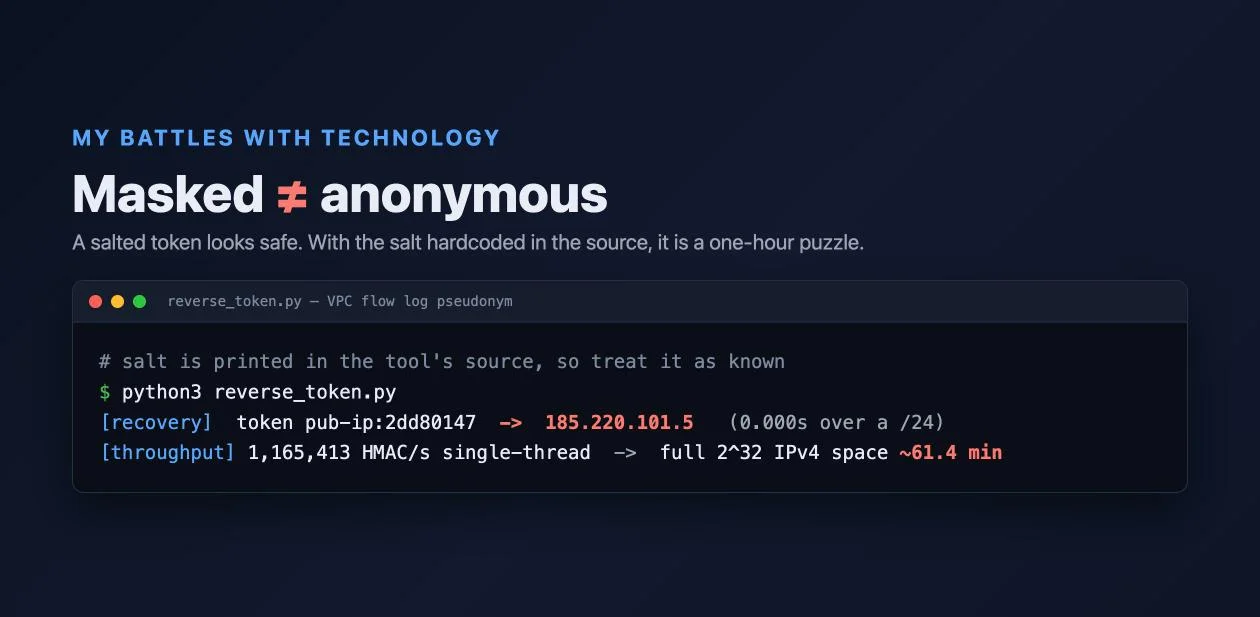
Finally Reality Check 6, the vulnerability. The privacy of every token rests on the salt staying secret, and this tool prints the salt in its source. So I treated the salt as known (because it is) and asked the obvious question: can I turn pub-ip:2dd80147 back into an IP? HMAC can’t be run backward, but I don’t need to; I can run it forward over candidate IPs until one matches. reverse_token.py does exactly that:
[recovery] token pub-ip:2dd80147  ->  185.220.101.5   (0.000s over a /24)
[throughput] 1,165,413 HMAC/s single-thread  ->  full 2^32 IPv4 space ~61.4 min
The first line recovered the real IP from its masked token in under a millisecond, because I only had to scan the 256 addresses of the attacker’s /24. The second line is the honest extrapolation: one CPU core computes about 1.2 million of these hashes a second, so sweeping every possible IPv4 address takes roughly an hour on a single core, and minutes across a handful of them. The masked log is not anonymous. It is a puzzle with a one-hour solution, for anyone who has read the source code where the key lives.
So how do you do this right? The pattern is fine; the implementation’s shortcuts are the problem, and the Reality Check’s own critique names the fixes:
- Keep the salt in a secret manager, never in source. AWS Secrets Manager or KMS, loaded at runtime, is the difference between “attacker needs to steal a running secret” and “attacker reads your public repo.” This is the same key-hygiene discipline I wrote about in Kubernetes Secrets Management: a secret in the code is not a secret.
- Rotate the key and version it, so a leak has a blast radius bounded in time and you can still line up tokens across a rotation when you need to.
- Don’t truncate to 8 characters, which both shortens the search and invites collisions; keep the full digest if you’re storing a pseudonym.
- Treat the enriched fields as sensitive too. Bucket the threat score into bands instead of an exact 95, drop the ASN string, generalize the tier. Masking the IP while printing its ASN is a half-measure.
The through-line is the same one I keep hitting in this series, most sharply with oci-explorer: a tool telling you something is safe is not the same as it being safe. There the gap was a green “A” that counted files without verifying them; here it is a 0% leakage banner that counts raw strings without asking whether the remainder re-identifies you. Both are worth distrusting in the same reflex, the one I leaned on in Tejolote too: recompute the claim yourself instead of trusting the tool’s summary of it.
Where this fits in a real environment
The README is honest that this is a reference implementation, and read that way it earns its place. If you are designing the privacy boundary between your logs and a managed LLM or a cross-tenant analytics system, this is a clear, dependency-free illustration of the one idea that is easy to get backward: enrich while you still have the raw data, mask immediately after. Clone it, run the lab, and you will understand enrich-before-mask in fifteen minutes. As a teaching artifact and a design sketch, it’s good.
Where it stops being enough is production, and the Reality Check says where. The single-process parser (point 1) belongs inside a real stream processor; the simulated intel (point 2) hides the hardest operational problem; and above all, the privacy guarantee is only real once the salt moves out of the source and into a managed secret with rotation (point 6), and once you stop treating the enriched metadata as harmless (point 4). Ship it as-is and the 0% banner is telling your compliance team something that lab step 5 disproves in under a millisecond.
Actionable Takeaways
- Enrich before you mask. Threat-intel and GeoIP need the real IP; do those lookups first, then mask. Reverse the order and you have thrown away the data’s value to buy its privacy.
- Pseudonymization is not anonymization. A deterministic token is reversible by anyone holding the key, and for a 32-bit input like an IPv4 address, “reversible” means an hour on one CPU core.
- The salt is the system. Keep it in a secret manager, give it a high-entropy value, version it, and rotate it. A key printed in source code protects nothing.
- Mask the metadata, not just the identifier. Country, ASN, exact scores, and subnet tiers re-identify hosts in combination. Bucket or drop them, or the masked IP is theater.
Masking is only as strong as the secret behind it and the metadata you choose to keep; strip the IP but print its ASN and exact threat score, and you have changed what the leak looks like, not whether there is one.
