Ask most teams what’s attached to the container image running in production and you’ll get an answer about their CI pipeline: “we sign it, we generate an SBOM, we attach provenance.” That’s a statement about what the pipeline tried to do. Whether the registry actually holds those things, linked to the right image, in a form the next tool can find, is a different question, and it’s surprisingly hard to answer in under a minute.
The Rabbit Hole Generator gave me oci-explorer this week, a tool built to answer exactly that question. Point it at an image and it draws everything hanging off it: the per-platform variants, the layers, and the supply-chain paperwork (signatures, SBOMs, attestations, VEX documents, all explained below), then rolls all of it into a 0-10 score with a letter grade.
I spent most of my thirty minutes poking at that score. It turns out it measures something narrower than its grade suggests, and the reason why is a nice tour of how messy “attaching things to an image” still is.
What is oci-explorer used for in container supply chain security?
oci-explorer is an open-source, single-binary web app (a Go backend serving a Svelte web UI) that inspects container images straight from a registry and shows them as a graph: the multi-platform index, each platform’s manifest, config, and layers, plus the supply-chain artifacts attached to the image. It finds those artifacts through every mechanism currently in use (the newer OCI 1.1 referrers API and the older tag-based conventions, both explained below), classifies them as signatures, SBOMs, attestations, or VEX, can run an on-demand Trivy vulnerability scan, and produces an embeddable “supply chain score” badge. It runs locally (for private registries and scanning) or as a hosted instance at ociexplorer.dev.
The Architecture: an image is a graph, not a file
The mental model oci-explorer pushes is that a container image isn’t one blob, it’s a tree of small JSON documents, each pointing at the next by its content hash (its digest, a sha256:... fingerprint of the exact bytes). The format for all of this is set by the Open Container Initiative (OCI), the industry body that standardizes container images and registries. At the top is usually an image index, a list saying “for linux/amd64 use this manifest, for linux/arm64 use that one.” Each manifest points at a config (entrypoint, user, environment, build history) and an ordered list of layers (the actual filesystem tarballs). Because everything is addressed by digest, nothing in the tree can change without its fingerprint changing too.
Supply-chain metadata hangs off that tree. A few terms worth having straight before going further:
- Signature: proof that someone holding a key (or, with Sigstore’s “keyless” mode, a short-lived certificate tied to an identity like a GitHub Actions workflow) vouched for this exact digest. The standard tool for creating and checking these is cosign, Sigstore’s command-line signer and verifier for container images.
- SBOM (Software Bill of Materials): an ingredients list of every package inside the image, usually in SPDX or CycloneDX format. CISA keeps a good plain-language overview.
- Attestation: a signed statement about the image. The most common is SLSA provenance, which records what built it, from which source, and how. I went deep on that in the Tejolote post.
- VEX (Vulnerability Exploitability eXchange): a vendor’s machine-readable statement about specific CVEs, like “yes, that library is in the image, but the vulnerable function is never reachable, so we’re not affected.” Its job is to cut down scanner noise by telling you which findings the vendor has already assessed. CISA’s minimum requirements for VEX is the authoritative description; OpenVEX is the format this image uses.
The hard part is how those things get attached, and this is where oci-explorer’s design earns its keep. There are currently four places a registry can hold them, and the diagram below shows all four on the real image I tested:
- Inside the index itself. Docker’s build engine (BuildKit) embeds SBOM and provenance as extra “attestation manifest” entries next to the real platform manifests.
- Specially named tags. Before there was a standard, cosign invented a naming convention: the signature for digest
sha256:abc...lives at the tagsha256-abc....sig, and attestations atsha256-abc....att. - The OCI 1.1 referrers API. Version 1.1 of the OCI Distribution Specification (the rulebook for how registries talk to clients) added a standard way to attach things: an artifact declares which image it’s about (its “subject”), and the registry offers an endpoint,
/v2/<repo>/referrers/<digest>, where you ask “what points at this digest?” and get a list back. - The referrers fallback tag. For registries that don’t implement that endpoint, the spec says clients should keep the list in a plain tag named
sha256-<digest>(no suffix) instead.
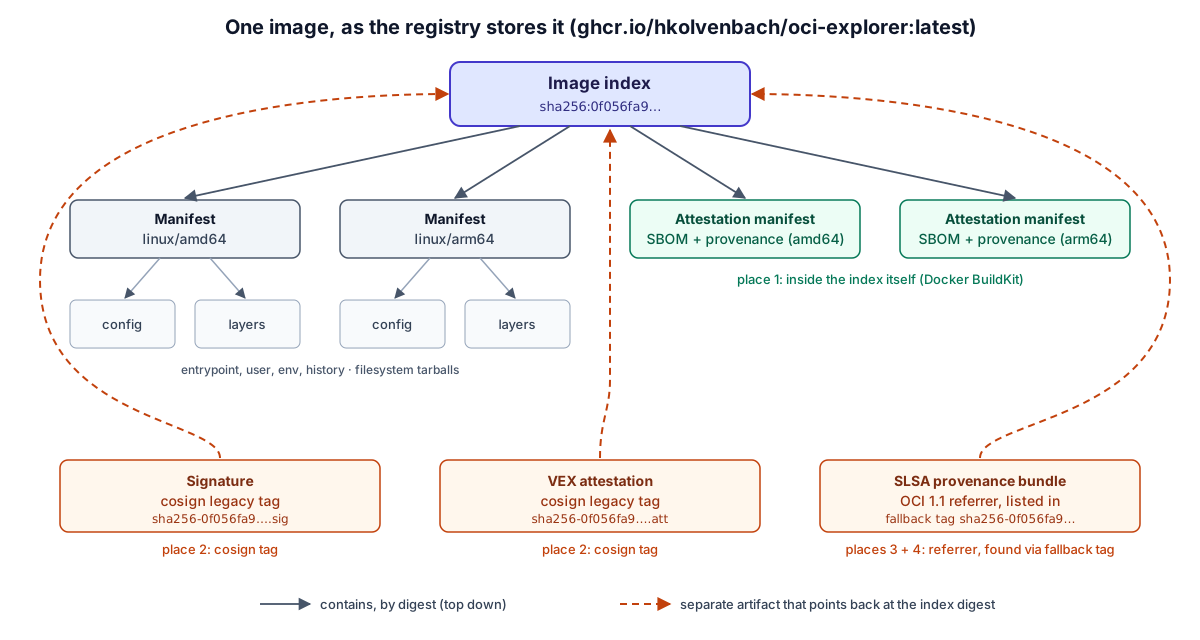
oci-explorer checks all four and merges them into one list. The usual command-line tools each answer one slice of the question well; this one tries to show the whole picture at once.
The Reality Check: where this breaks
So far that’s the pitch: one view of everything attached to an image, plus a score. Every week, the Rabbit Hole Generator also writes a critique of its pick: the ways the tool is likely to fail at scale, the assumptions its design quietly depends on, and the security hole it might open up. This section walks through that critique point by point, because knowing where a tool breaks is what tells you where to trust it.
The Rabbit Hole Generator’s critique of oci-explorer had eight distinct points. Each numbered heading below is one of them, in three groups:
- Points 1 to 4 are about scale and shared hosting. They describe what happens with hundreds of tags, many users, or a public deployment. I didn’t test these; reproducing them takes a fleet of images or real multi-user traffic, which a 30-minute lab on one laptop can’t fake honestly. I’ve read the code paths and say what I’d expect, but treat them as informed predictions.
- Points 5 to 7 are assumptions the design leans on. I tested 5 and 6, because both could be checked against a real registry in a few minutes. Point 7 (using your local Docker credentials) is a deployment decision rather than a behavior, so there was nothing to measure.
- Point 8 is the vulnerability the tool itself introduces. I tested it, but only against my own local copy.
Each tested point says so in its heading, and links to the lab step that tested it.
1. Registry traversal fans out fast
Every image view triggers a cascade of requests: the index, each platform manifest, each config, referrers per digest, cosign tag lookups, and tag listing for alias discovery. Against a repository with hundreds of tags (oci-explorer’s own repo has 237), that’s a lot of round trips per click, and public registries rate-limit anonymous pulls aggressively. Fine for one engineer looking at one image; harder as a shared service.
2. On-demand Trivy scans don’t amortize
Vulnerability scanning shells out to Trivy, which pulls the image layers, loads its vulnerability database, and analyzes everything. That’s CPU- and memory-heavy work sitting inside what is otherwise a thin metadata viewer. Repeated scans of popular images on a hosted instance turn the single binary into the bottleneck.
3. Dense referrer graphs become unreadable
A multi-arch image with per-platform SBOMs, provenance, signatures, and VEX quickly becomes a node explosion in a browser graph view. The details pane stays usable; the “see it all at once” graph, which is the tool’s selling point, degrades exactly when the image is most thoroughly documented.
4. Hosted multi-tenant use has weak isolation
The optional S3-compatible cache keys responses by digest, which is sensible because OCI content is immutable. But a hosted instance serving many users, some of them browsing private registries, needs tenancy boundaries and cache-invalidation rules that a digest-keyed cache doesn’t provide on its own.
5. It assumes registries implement referrers consistently (tested: they don’t)
This one I watched happen. GHCR (GitHub’s container registry, where oci-explorer publishes its own image) returned 404 when I queried the referrers API directly, so everything I found came through the other three places.
A fair question is whether that 404 is just GitHub hiding something I’m not allowed to see; GHCR does answer “not found” or “denied” for things you lack access to. So I checked with a single anonymous token: the same token read the image manifest (200) and the fallback tag (200), then got 404 MANIFEST_UNKNOWN from the referrers endpoint for that same digest. The token clearly had access, so the endpoint simply isn’t answering there.
The tool’s own changelog tells a sharper version of the story. In August, a routine Dependabot (GitHub’s automated dependency updater) bump moved the project’s CI to a newer cosign that stores attestations in the referrers format by default. GHCR’s referrers endpoint answered with a redirect to a URL that 404s, and the project’s own VEX attestation silently vanished from ociexplorer.dev, while the release smoke test kept passing because cosign verify-attestation understands both formats. The fix was pinning cosign back to the legacy .sig/.att tags. If the tool’s author can lose their own VEX document to this, the assumption is load-bearing.
6. It assumes artifact presence is a proxy for supply-chain quality (tested: it isn’t)
The score is 2 points each for having a signature, an attestation, an SBOM, and VEX, plus up to 2 points for “minimal base” traits. Nothing checks that a signature verifies, who signed it, whether an SBOM matches the image, or whether a VEX statement is current. Lab step 4 shows what that means in practice.
7. It assumes Docker credential helpers are an acceptable trust boundary
Run locally, oci-explorer logs in to registries using whatever the host’s Docker credential helpers provide (the small programs that hand Docker your saved registry logins). That’s convenient for a laptop. It’s a much bigger deal for anything reachable by other people, because the web app now browses private registries as you.
8. Introduced Vulnerability: it’s a server-side request engine (tested)
The core feature is “type in any image reference and the server fetches it.” That means user input decides where the server makes outbound requests, which is the definition of a server-side request forgery (SSRF) surface: getting a server to make requests on your behalf to places you can’t reach yourself, like internal hosts. Combine that with point 7 and a shared instance could be steered to use its configured credentials against registries the requester shouldn’t touch. In lab step 5, the error messages alone were enough to map hosts and ports on a private network.
The 30-Minute Lab: auditing the score, then auditing the tool
The Rabbit Hole Generator’s challenge was to compare raw registry data against oci-explorer’s UI for an image with real supply-chain metadata. I did that, then pushed on the three Reality Check points I could test on one machine: 5 (where artifacts actually live), 6 (what the score means), and 8 (what the tool reveals about the network it runs on). Everything ran in throwaway Docker containers.
1. Running it, and the instructions that had already drifted
The Rabbit Hole Generator suggested building from source with go run .. That doesn’t work on its own anymore: the Go binary embeds the compiled web UI, so you’d also need Node.js to build the frontend first. The project’s own published image is the simpler and more contained path, and it bundles Trivy:
docker network create ocilab
docker run -d --rm --name ocix --network ocilab -p 18080:8080 \
  ghcr.io/hkolvenbach/oci-explorer:latest
┌─────────────────────────────────────────────────┐
│           🐳 OCI Image Explorer                 │
├─────────────────────────────────────────────────┤
│  URL:      http://localhost:8080                │
│  Platform: linux/arm64                          │
│  Version:  1.1.28                               │
└─────────────────────────────────────────────────┘
The banner reports the port inside the container. Because of -p 18080:8080, the UI is at http://localhost:18080 in your browser: type an image reference in the search box and click Inspect. The same data is available as JSON from http://localhost:18080/api/inspect?image=<reference>, which is what I used for the command-line steps. The private ocilab network matters later; it’s how I tested what the tool can reach.
One more drift worth knowing. A second version of this week’s challenge suggested inspecting ghcr.io/distroless/static-debian12. That image doesn’t exist; Google’s distroless images live at gcr.io/distroless/static-debian12 (Google’s registry, not GitHub’s, one letter apart). oci-explorer correctly reported the error, and GHCR phrased it as access denied rather than not found, the same ambiguity Reality Check 5 ran into. The lesson: when an AI-written setup step fails, first confirm the thing it names actually exists, before assuming the tool is broken.
2. Raw registry truth first
Before trusting any visualization, I wanted to know what the registry itself says, using the standard command-line tools that talk to registries directly and have no score or UI of their own. If oci-explorer claims to find five artifacts, I want an independent count to compare against. Three tools, because each sees the registry differently:
- regctl and oras are general-purpose registry clients. Both have commands that ask the referrers question: “what’s attached to this image?”
- crane (from Google’s go-containerregistry project) is lower level: it lists tags and dumps raw manifests, with no opinion about what anything means.
First, the two referrer-aware tools:
docker run --rm ghcr.io/regclient/regctl:latest \
  artifact tree ghcr.io/hkolvenbach/oci-explorer:latest
Digest: sha256:0f056fa93a4da4b2abf2106811ef101b38cf33efe7865f440752a46350c0c968
Children:
  - sha256:1d237d70... [linux/amd64]
  - sha256:efbe507b... [linux/arm64]
  - sha256:ead69235... [unknown/unknown]
  - sha256:97edcd56... [unknown/unknown]
Referrers:
  - sha256:22748d7c...: application/vnd.dev.sigstore.bundle.v0.3+json
docker run --rm ghcr.io/oras-project/oras:v1.3.0 \
  discover ghcr.io/hkolvenbach/oci-explorer:latest
ghcr.io/hkolvenbach/oci-explorer@sha256:0f056fa93a4da4b2abf2106811ef101b38cf33efe7865f440752a46350c0c968
└── application/vnd.dev.sigstore.bundle.v0.3+json
    └── sha256:22748d7ce68a176aa916550cb909eb4e606fe39bff15f41f24be8aa5e1a48c5e
        └── [annotations]
            ├── dev.sigstore.bundle.content: dsse-envelope
            └── dev.sigstore.bundle.predicateType: https://slsa.dev/provenance/v1
Both agree: one referrer, a SLSA provenance bundle. That looks thin for an image whose README says it’s signed and carries an SBOM, provenance, and VEX. So either the README is wrong, or the rest is stored somewhere these commands don’t look. That’s the reason to reach for crane: it doesn’t interpret anything, so it can show what’s physically there.
crane() { docker run --rm gcr.io/go-containerregistry/crane:latest "$@"; }

crane ls ghcr.io/hkolvenbach/oci-explorer | grep '^sha256-0f056fa9'
sha256-0f056fa93a4da4b2abf2106811ef101b38cf33efe7865f440752a46350c0c968.sig
sha256-0f056fa93a4da4b2abf2106811ef101b38cf33efe7865f440752a46350c0c968
sha256-0f056fa93a4da4b2abf2106811ef101b38cf33efe7865f440752a46350c0c968.att
Three tags named after the image’s own digest: cosign’s .sig and .att (place 2 in the diagram) and the bare referrers fallback tag (place 4). Looking inside them and inside the index:
IMG=ghcr.io/hkolvenbach/oci-explorer
D=sha256-0f056fa93a4da4b2abf2106811ef101b38cf33efe7865f440752a46350c0c968
crane manifest "$IMG:latest"   # the index's entries
crane manifest "$IMG:$D.sig"   # what the .sig tag holds
crane manifest "$IMG:$D.att"   # what the .att tag holds
index:  sha256:1d237d704f19  linux/amd64
        sha256:efbe507bba10  linux/arm64
        sha256:ead69235dc2e  unknown/unknown  attestation-manifest
        sha256:97edcd563a82  unknown/unknown  attestation-manifest
.sig:   application/vnd.dev.cosign.simplesigning.v1+json
.att:   application/vnd.dsse.envelope.v1+json  predicateType: https://openvex.dev/ns
(Trimmed from the raw JSON to the fields that matter.) That accounts for everything:
- The two
unknown/unknownchildren are BuildKit attestation manifests, one per platform, each holding an SPDX SBOM and a SLSA provenance document (place 1). - The
.sigtag holds the cosign signature, and the.atttag holds the OpenVEX attestation (place 2). - The one “real” referrer that regctl and oras found is listed in the fallback tag (place 4), because GHCR’s referrers endpoint (place 3) returned
404, as covered in Reality Check 5.
Four storage mechanisms for one image. This is the whole case for a tool like oci-explorer: someone using only regctl or oras discover here would conclude the image has one attestation and nothing else.
3. oci-explorer’s view, and the score
Now the same image through oci-explorer. In the browser at http://localhost:18080, inspecting ghcr.io/hkolvenbach/oci-explorer:latest gives this summary:
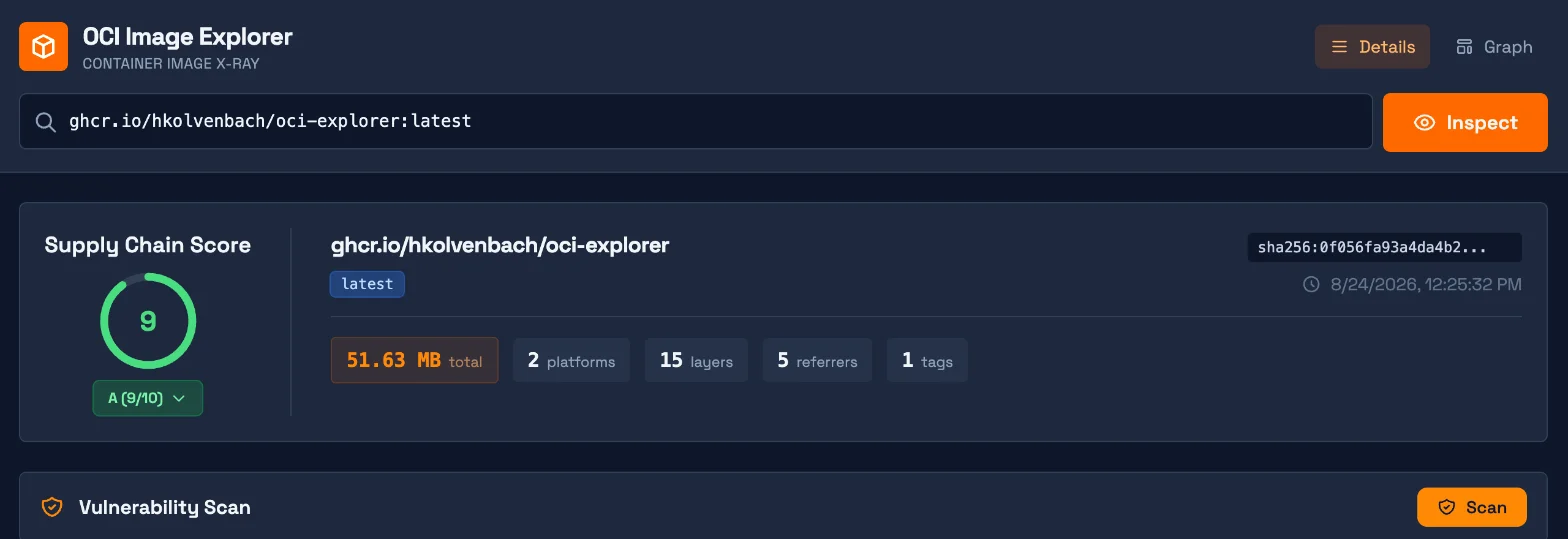
The API returns the same thing as JSON. The full response is long, so this trims it to the score and the referrer list:
curl -s "http://localhost:18080/api/inspect?image=ghcr.io/hkolvenbach/oci-explorer:latest" \
  | jq '{score: {score: .data.score.score, grade: .data.score.grade,
               criteria: [.data.score.criteria[] | {key, present}]},
         referrers: [.data.referrers[] | {type, artifactType}
                     + (if .signatureInfo then {signatureInfo: (.signatureInfo | {issuer, identity})} else {} end)]}'
{
  "score": {
    "score": 9,
    "grade": "A",
    "criteria": [
      { "key": "signature",   "present": true },
      { "key": "attestation", "present": true },
      { "key": "sbom",        "present": true },
      { "key": "vex",         "present": true },
      { "key": "minimalBase", "present": true }
    ]
  },
  "referrers": [
    { "type": "sbom",        "artifactType": "https://spdx.dev/Document" },
    { "type": "sbom",        "artifactType": "https://spdx.dev/Document" },
    { "type": "attestation", "artifactType": "application/vnd.dev.sigstore.bundle.v0.3+json" },
    { "type": "signature",   "artifactType": "application/vnd.dev.cosign.simplesigning.v1+json",
      "signatureInfo": {
        "issuer": "https://token.actions.githubusercontent.com",
        "identity": "https://github.com/hkolvenbach/oci-explorer/.github/workflows/release.yml@refs/heads/main"
      } },
    { "type": "vex",         "artifactType": "https://openvex.dev/ns" }
  ]
}
Five referrers, merged from all four places. The fields worth looking at:
referrers[].type: confirms the tool found every mechanism. Here it did, whichregctlandorasalone did not.signatureInfoon the signature: the issuer is GitHub Actions and the identity is therelease.ymlworkflow onmain. This is the most useful field in the response. It says who claims to have signed: a specific workflow in a specific repo. If this were blank, or named a workflow or repo you didn’t expect, that’s your red flag.score.criteria: each item is justpresent: true/false. EvenminimalBaseshowstruehere when, per the full response, two of its four traits (few layers, small size) are false; meeting half earns the checkmark.
Clicking Scan in the UI runs the bundled Trivy: 50 vulnerabilities, 14 of them marked “Not Affected” via the project’s own VEX document (“Vulnerability is in a bundled third-party binary, not in OCI Explorer code”). That’s VEX doing its job: the vendor telling you which findings they’ve assessed. It’s also worth remembering that it’s the vendor’s claim, signed by the vendor.
oci-explorer displaying a signer identity isn’t the same as that signature being valid, so I checked it independently with cosign, pinning the identity and issuer I expect:
docker run --rm ghcr.io/sigstore/cosign/cosign:v2.5.3 verify \
  --certificate-identity-regexp="https://github.com/hkolvenbach/oci-explorer" \
  --certificate-oidc-issuer="https://token.actions.githubusercontent.com" \
  ghcr.io/hkolvenbach/oci-explorer:latest
  - Existence of the claims in the transparency log was verified offline
  - The code-signing certificate was verified using trusted certificate authority certificates
  [{"critical":{"identity":{"docker-reference":"ghcr.io/hkolvenbach/oci-explorer"},
    "image":{"docker-manifest-digest":"sha256:0f056fa93a4da4b2..."}, ...
This is the step that matters. cosign checked the signature’s math, that the certificate chains to Sigstore’s certificate authority, that the signing event is recorded in Rekor (Sigstore’s public, append-only transparency log), and that the digest inside the signed payload matches the image I asked about. oci-explorer showed me the same identity, but showing isn’t verifying. Which raised the obvious question.
4. What does an unverified “A” look like?
Reality Check 6 is the Rabbit Hole Generator’s claim that the score rewards presence rather than quality. If that’s true, it matters: a green “A” badge in a README is exactly the kind of thing people glance at instead of verifying. So the question for this step is concrete: can an image with no real supply-chain evidence at all earn the same grade as one that’s properly signed?
Reading the source suggested yes. Referrers are classified by substring matching on their artifactType: anything containing “signature”, “sbom”, “vex”, or “provenance” lands in that category, and each category found is worth 2 points. So I built the cheapest possible counterexample.
oci-explorer won’t talk to a plain-HTTP local registry, so I used ttl.sh, an anonymous public registry whose content deletes itself when the tag’s time limit runs out (:1h here), and copied a stock busybox image into it:
R=ttl.sh/rabbithole-$(openssl rand -hex 6)
crane copy --platform linux/arm64 busybox:1.37 "${R}:1h"
Score: 1/10, grade D, no referrers. Then I attached four copies of a 20-byte text file reading “not a real anything”, each with an artifact type containing one of the magic words (oras attach uploads a file as a referrer of an image):
echo "not a real anything" > junk.txt
for t in signature sbom vex provenance; do
  docker run --rm -v "$PWD":/w -w /w ghcr.io/oras-project/oras:v1.3.0 \
    attach --artifact-type "application/vnd.example.junk.$t" "${R}:1h" junk.txt
done
BEFORE: referrers: []                                          | score: 1 D
AFTER:  referrers: ['signature', 'sbom', 'vex', 'attestation'] | score: 9 A
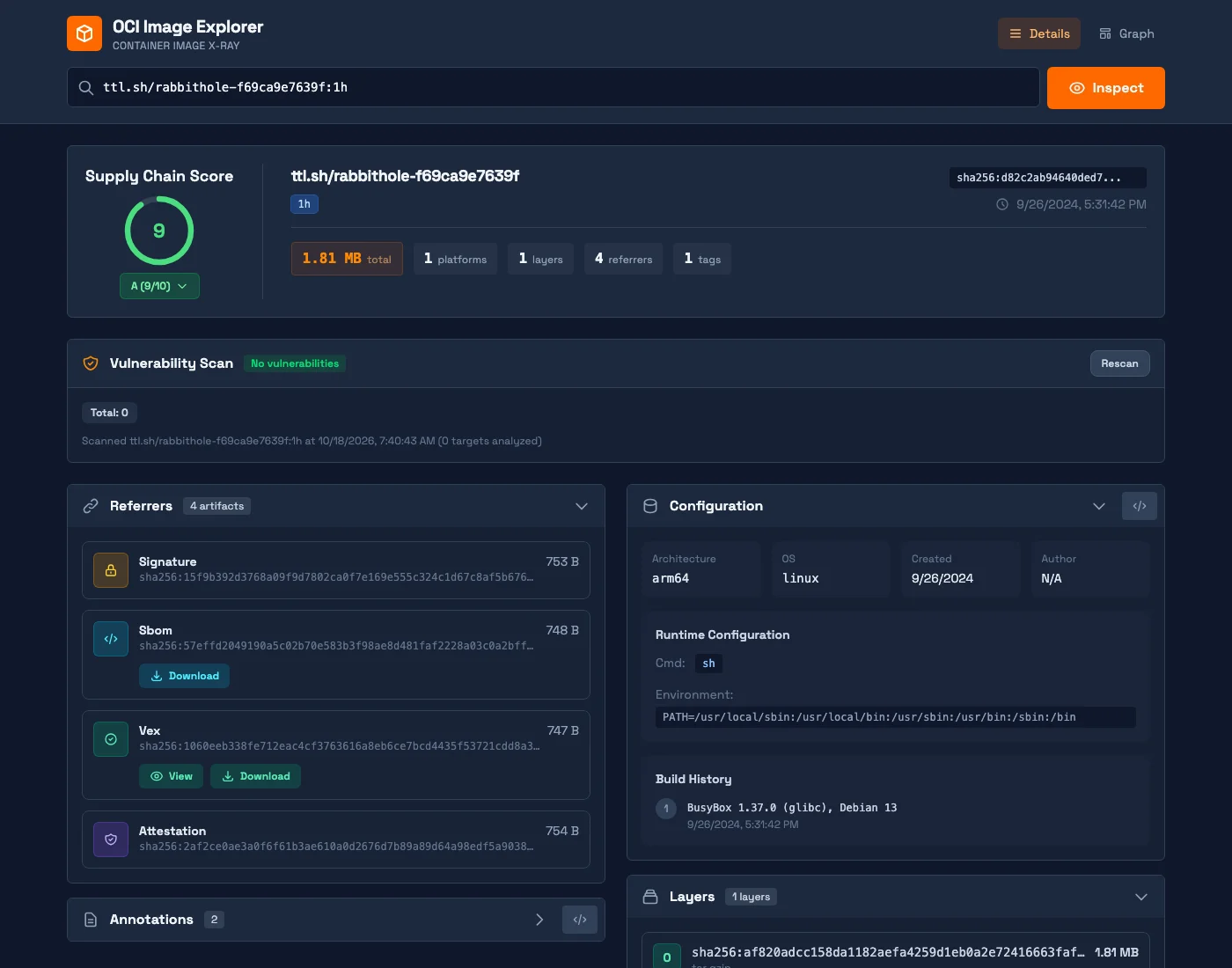
Same 9/10, same green A, as the image I’d just verified end to end with cosign. For contrast, Google’s gcr.io/distroless/static-debian12, which ships real signatures and SBOMs but no VEX or provenance referrers, scored 4.5: a well-maintained image graded lower than four junk files. The tell is in the details: my junk “signature” has no signatureInfo at all, no issuer, no identity. The score doesn’t look there; you have to.
To be fair to the tool, the README describes the score as evaluating “supply chain artifact presence,” and that’s exactly what it does. The problem is the badge. The badge endpoint returns only the letter ("message":"A"), and a green A in a README reads as “this image’s supply chain checks out.” What it actually means is “files with the right names are attached.”
So how do you get a grade you can trust? Use the score as a map of what to verify, then verify each item with a tool that checks cryptography and identity. Pointed at the junk image, the same cosign commands from step 3 fail immediately:
cosign() { docker run --rm ghcr.io/sigstore/cosign/cosign:v2.5.3 "$@"; }

cosign verify --certificate-identity-regexp='.*' \
  --certificate-oidc-issuer-regexp='.*' "${R}:1h"
Error: no signatures found
cosign verify-attestation --type openvex \
  --certificate-identity-regexp='.*' \
  --certificate-oidc-issuer="https://token.actions.githubusercontent.com" "${R}:1h"
Error: no matching attestations:
That’s with the identity check wide open (.* accepts any signer), and it still finds nothing, because a file named signature isn’t a signature. The real image passes the same VEX check and names exactly who produced it:
Verification for ghcr.io/hkolvenbach/oci-explorer:latest --
  - The cosign claims were validated
  - Existence of the claims in the transparency log was verified offline
  - The code-signing certificate was verified using trusted certificate authority certificates
Certificate subject: https://github.com/hkolvenbach/oci-explorer/.github/workflows/release.yml@refs/heads/main
Certificate issuer URL: https://token.actions.githubusercontent.com
In practice, the “trust but verify” path looks like this:
- By hand: read
signatureInfoinoci-explorerto learn who claims to have signed, then confirm withcosign verify(andcosign verify-attestation --type <slsaprovenance|spdxjson|openvex>for attestations), pinning the exact identity and issuer you expect instead of.*. - Automatically: in Kubernetes, an admission controller (a gatekeeper that inspects every deployment before it’s allowed to run) can enforce the same checks on every image, using Sigstore’s policy-controller or Kyverno’s image verification. Those check signatures and attestation contents, not just presence.
5. What the server will reach for you
Last, Reality Check 8. Why does this matter at all? On a laptop, it mostly doesn’t: you’re the only user, and you can already reach everything the tool can. It matters the moment an instance is reachable by other people, like the public ociexplorer.dev or a shared copy set up for a team, because then strangers decide where your server sends requests, from inside your network and possibly with your registry credentials (point 7). The question for this step is how much an outsider could learn that way.
To test it without touching anything real, I needed a stand-in for “an internal service only the server can see.” I used zot, a small open-source OCI registry, started on the private ocilab Docker network under the hostname zot, a name that only resolves inside that network. Then I asked oci-explorer to inspect references pointing at it, at a closed port, at a host that doesn’t exist, and at itself:
for ref in zot:5000/demo:v1 zot:6000/demo:v1 nosuchhost.internal/demo:v1 ocix:8080/demo:v1; do
  curl -s "http://localhost:18080/api/inspect?image=$ref" | jq -r .error
done
zot:5000      Get "https://zot:5000/v2/": http: server gave HTTP response to HTTPS client
zot:6000      Get "https://zot:6000/v2/": dial tcp 172.18.0.3:6000: connect: connection refused
nosuchhost    Get "https://nosuchhost.internal/v2/": dial tcp: lookup nosuchhost.internal ...: no such host
ocix:8080     Get "https://ocix:8080/v2/": http: server gave HTTP response to HTTPS client
Read those four lines from the outside. They distinguish “host exists and something is listening” from “host exists, port closed” (and leak its internal IP, 172.18.0.3) from “host doesn’t exist.” That’s enough to map a private network one request at a time, through a tool whose whole job is accepting arbitrary references. None of this is exotic; it’s the textbook SSRF pattern, and it’s a property of the deployment shape rather than a bug in the code.
The practical takeaways are the boring ones: run it locally or behind authentication; if you host it, restrict the server’s outbound network access to the registries you actually use; and don’t configure registry credentials on any instance strangers can reach. The project could also return generic error messages to API callers, which would remove most of the mapping signal. I tested this only against my local instance and did not probe the hosted ociexplorer.dev.
Where this fits in a real environment
For the question it set out to answer, what is attached to this image, and where is it hiding?, oci-explorer gave me the most complete answer of the tools I tried this week. Lab step 2 is the evidence: four storage mechanisms on one image, and regctl and oras each saw a single referrer, while crane only gave me raw pieces to assemble by hand. If you’re debugging why an admission controller can’t find your SBOM, or checking that a pipeline change didn’t quietly stop publishing VEX (exactly what happened to this project, per Reality Check 5), run it locally and look.
Where it stops being enough is the score. Treat it as an inventory checklist, not a trust signal: Reality Check 6 and lab step 4 show it rewards presence, so anything that gates a deployment needs real verification, like cosign verify with a pinned identity or an admission policy that checks signatures and attestation contents. And keep it local or behind authentication, per Reality Checks 7 and 8: a publicly reachable instance with registry credentials is a request engine pointed at your network. For a fleet view at scale, points 1 through 4 suggest you’ll want registry-side tooling rather than a single interactive binary.
Actionable Takeaways
- Look at the signer, not the score. The
signatureInfoissuer and identity tell you who claims to have vouched for an image; a green grade tells you a file with the right name exists. - Verify with cosign before you trust a signature. Pin the expected identity and OIDC issuer, and let cosign check the certificate chain and transparency log.
- Check where your artifacts actually landed. Signatures, SBOMs, and attestations can live in four different places today, and a tooling upgrade can move them without failing your pipeline.
- Never expose an image inspector to untrusted users. A tool that fetches arbitrary references is an SSRF surface, and its error messages map your network.
Supply-chain metadata is only as good as the check that reads it, and “it’s attached” is the weakest check there is.
