Every Kubernetes cluster has a moment, right before anything is written to its database, where it can say no. A pod that wants to run as root on the node, a role that grants * on everything, a service that opens a port on every machine: all of them pass through a checkpoint called admission control, and that checkpoint is where most cluster-hardening advice ends up. The trouble is that admission control is easy to configure and hard to see. Policies sit in the cluster as objects. Whether they actually stop anything depends on bindings, labels, versions, and ordering that no single kubectl get shows you.
The Rabbit Hole Generator picked KubeAPT this week, a command-line tool that manages and audits Kubernetes’ built-in admission policies without installing anything in the cluster. The point for a security or platform reader is the gap between “we have policies” and “the cluster refuses bad things.” That gap turned out to be wide. I installed KubeAPT’s own best-practices bundle into a test cluster, and its scanner happily reported 176 policies present. Its newer analyze command then sent 178 deliberately dangerous objects at the cluster, and none of them were blocked. Getting from there to a cluster that actually refuses things took two snags, a design quirk where some of the most dangerous objects are only checked if they ask to be, and a handful of small scripts that I’d want in any real rollout.
Along the way I also found and fixed a small bug in how analyze grades its own results, tampered with a policy bundle to see what its checksum really proves, and ran the whole thing against an older cluster to see what “portable” means here. All of it ran in Docker on a Mac.
What is KubeAPT used for in Kubernetes security?
KubeAPT (Kubernetes Admission Policy Toolkit) is an open-source Go command-line tool from cenroq for checking and managing Kubernetes admission hardening from the outside. It reads a cluster’s ValidatingAdmissionPolicies (native policy rules written in a small expression language), Pod Security Admission labels, and webhook registrations; evaluates policies against YAML files offline; downloads and installs curated policy bundles; and, since October, probes a live cluster with harmless dry-run requests to report what its admission chain actually blocks. Nothing runs inside the cluster: every command is a client making normal API calls, which makes it a fit for CI pipelines, cluster bootstrap scripts, and spot checks during an incident.
The Architecture: three commands, three different questions
Some vocabulary first, because Kubernetes admission control has a lot of it.
- Admission control is the stage of every create or update request where the API server (the front door every
kubectlcommand talks to) decides whether to accept the object, after it knows who you are and that RBAC (role-based access control, Kubernetes’ permission system) allows you to try, and before it saves anything. The Kubernetes docs describe it as a chain: some steps can change the object (mutating), others can only accept or reject it (validating). - A webhook is the traditional way to add your own rules to that chain: the API server calls out over HTTPS to a service you run, and that service answers yes or no. Policy engines like Kyverno and OPA Gatekeeper work this way. It’s flexible, but it means running and securing another service, and deciding what happens when that service is down (its failurePolicy:
Failclosed orIgnoreand let things through). - A ValidatingAdmissionPolicy (VAP) is the built-in alternative, stable since Kubernetes 1.30. The rule is written in CEL, the Common Expression Language, a small, safe expression language Google designed for exactly this kind of check (
object.spec.containers.all(c, c.securityContext.privileged != true)), and the API server evaluates it in-process. No extra service. - A binding (ValidatingAdmissionPolicyBinding) is what makes a VAP do anything. The policy says what is wrong; the binding says where it applies (which namespaces or objects, chosen by labels) and what happens:
Deny,Warn(a message back to the user), orAudit(a note in the audit log). A policy with no matching binding is a document, not a control. - Pod Security Admission (PSA) is a second built-in check that only looks at pods. You label a namespace with
pod-security.kubernetes.io/enforce=restricted(orbaseline), and the API server rejects pods that break the matching Pod Security Standard, a published three-level ladder fromprivileged(anything goes) torestricted(non-root, no extra capabilities, and so on). It’s on by default; it just does nothing until a namespace is labeled. - A dry run is a request the API server processes fully, admission chain included, and then throws away instead of saving. It’s the safe way to ask “would you accept this?”
With that, KubeAPT is easiest to understand as three commands that each answer a different question, plus a package manager for policies:
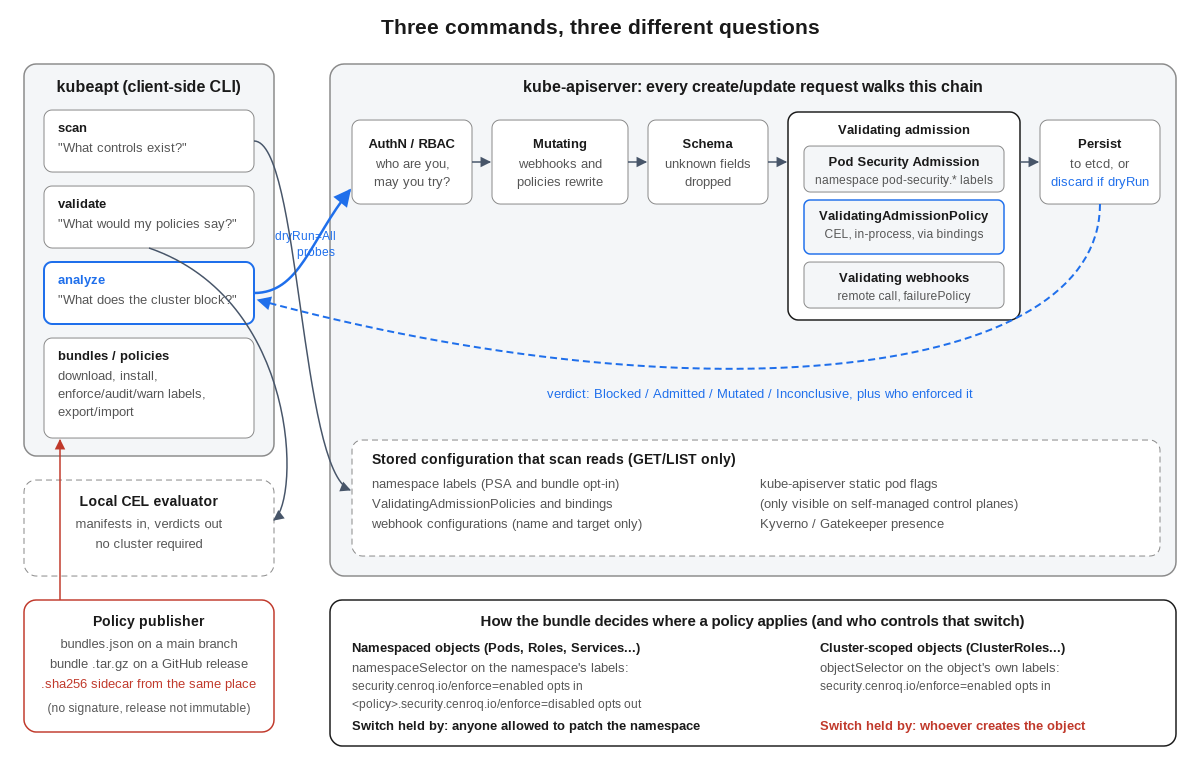
scanasks “what controls exist?” It lists namespaces and their PSA labels, counts VAPs, checks for Kyverno or Gatekeeper, reads the API server’s startup flags, and lists webhook registrations. It only reads stored configuration.validateasks “what would my policies say about these objects?” It runs the CEL itself, locally, against YAML files or objects pulled from a cluster. No API server needs to support VAPs for this to work.analyzeasks “what does this cluster actually block?” It submits deliberately bad objects as dry runs and records whether each was blocked, admitted, or changed, and which layer made the call. This command was added on October 20, a month after the Rabbit Hole Generator wrote this week’s challenge (the series works through a backlog, so a pick can be a couple of months old by the time I write it up). It ended up being the most important part of the tool.bundlesandpoliciesdownload curated rule sets from cenroq’s policy repository, install them, and set the namespace labels that switch them on.
The design bet is “native over installed”: use the API server’s own admission features instead of running a policy engine in the cluster, and keep the tool itself outside the cluster entirely. That removes a moving part. As the lab shows, it also moves the hard questions into bindings and labels, which is exactly where the Rabbit Hole Generator’s critique aimed.
The Reality Check: where this breaks
That’s the pitch. Each week the Rabbit Hole Generator also writes a critique of its pick: where it fails at scale, what it quietly assumes, and what security problem it might introduce. This week’s has six distinct points:
- Points 1 to 3 are about scale and portability. I tested 2 and 3 directly. Point 1 is about hundreds of clusters; I measured the per-cluster cost on two and did the arithmetic rather than pretend two laptops are a fleet.
- Points 4 and 5 are assumptions about the environment. I tested both.
- Point 6 is the vulnerability the tool introduces. I tested it end to end, and it’s the most instructive part of the lab.
1. Point-in-time scans don’t scale to a fleet (measured, not simulated)
Running a fast local command against one cluster is easy. Running it against hundreds means per-cluster credentials, scheduling, retries, and API rate limits. KubeAPT has no fleet mode; it’s one kubeconfig at a time. Lab step 11 measures what one analyze run costs (838 dry-run requests for seven namespaces, about 15 seconds, capped by the tool at 50 requests per second) and extrapolates, labeled as extrapolation.
2. Snapshot findings go stale immediately (tested)
Clusters change constantly: GitOps controllers (tools that continuously sync a cluster to what’s in a Git repo, per the OpenGitOps principles) re-apply objects, namespaces come and go, and someone with the right access can relabel a namespace in one command. KubeAPT reports what was true when it ran. Lab step 7 flips a policy off with one namespace label after a clean run, and lab step 9 swaps in a tampered bundle that a fresh analyze run can’t see at all.
3. Curated policies aren’t portable across Kubernetes versions (tested)
Admission APIs, CEL features, and even the fields a Pod accepts differ by release. Each bundle policy carries a minimum-version annotation for its content (158 of the 176 say 1.27), but installing any of them needs the API version that only exists from 1.30. On a 1.29 cluster in lab step 10, none could be installed, though offline validate still worked. The same analyze probes also meant something different there: the older API server silently dropped fields it didn’t know.
4. It assumes the cluster supports native VAPs (tested)
Closely related to point 3, but about failure behavior. On the 1.29 cluster, scan printed a warning and exited 0, and bundles install failed with “the server could not find the requested resource,” with no hint that the cluster was simply too old (lab step 10). validate kept working, because it evaluates CEL locally.
5. It assumes broad read access (tested)
Security teams rarely get cluster-wide list rights on every cluster. With a namespace-scoped read-only identity in lab step 8, scan failed on its first API call, and analyze marked all 145 testable probes Inconclusive. That part is good design. The catch: analyze --pipeline, the CI mode, still exited 0, so a pipeline with a broken token would pass.
6. Introduced Vulnerability: the policy bundle is a supply chain (tested)
KubeAPT downloads rule sets from the internet and applies them to the most security-sensitive layer of your cluster. A compromised publisher, account, or build could ship a bundle that blocks everything (an outage) or quietly exempts the attacker’s workloads. The tool checks a SHA-256 checksum, but in lab step 9 the checksum file comes from the same place as the bundle, so a tampered bundle with a regenerated checksum installed cleanly, and its backdoor was invisible to analyze. A pinned digest and a small diff script caught it.
Two findings went beyond the critique, and both are about who controls the on/off switch. Cluster-scoped objects like ClusterRoles are only checked if the object itself carries an opt-in label (lab step 6), and any namespace can be opted out of a policy by anyone who can label it (lab step 7). Both are shown with a fix.
The 30-Minute Lab: from “policies present” to “policies proven”
The Rabbit Hole Generator’s challenge was a “trust-and-capability report” before giving the tool any cluster credentials: build it, run its tests, and grep its source for admission primitives to see whether it “distinguishes policy existence from effective enforcement configuration.” I did that first (step 1). But a grep can’t answer that question, and since October the tool has a command that can, so I gave it two real clusters and asked. Everything ran in containers. It took a lot longer than 30 minutes, mostly because each answer raised the next question.
All the lab files are in this post’s bundle: start with README.txt.
1. Building the lab
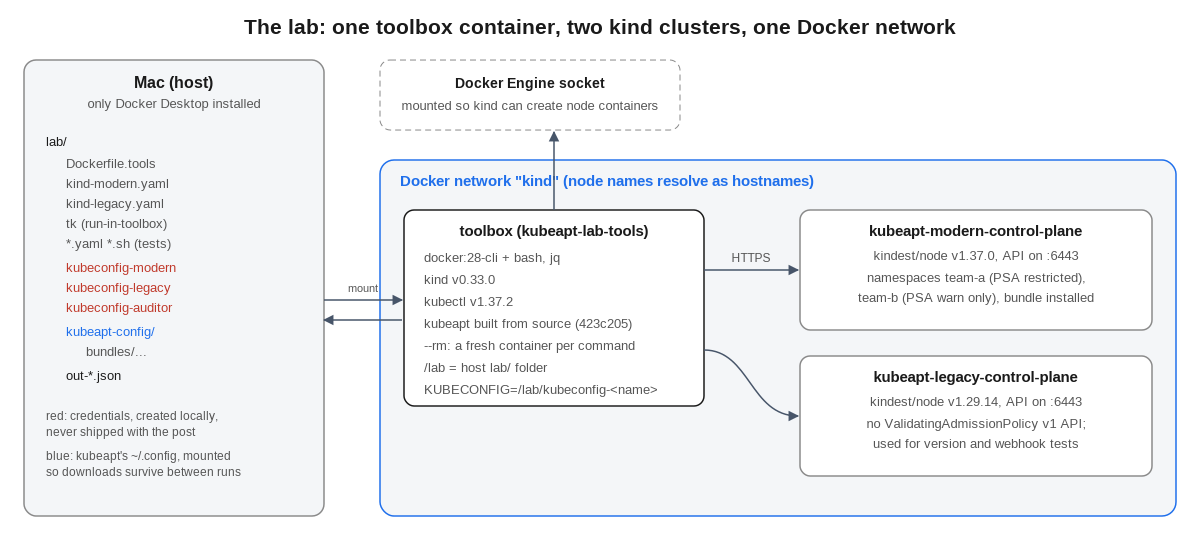
The pieces. kind (“Kubernetes in Docker”) runs a whole Kubernetes node inside one container, which makes it the standard way to get a real, disposable cluster on a laptop. I built one toolbox image holding the Docker CLI, kind, kubectl, and KubeAPT compiled from source at commit 423c205 (November 12), so nothing gets installed on the Mac. The toolbox gets the Docker socket mounted, so kind inside it can create node containers next to it, and it joins the kind Docker network so it can reach the clusters by container name. Two clusters: modern on Kubernetes 1.37.0 for most of the work, and legacy on 1.29.14 for the version tests. Node images are pinned by digest so a reader gets the same versions.
# Dockerfile.tools (abridged)
FROM golang:1.26 AS build
RUN git clone https://github.com/cenroq/kubeapt.git /src && cd /src && git checkout 423c205 \
 && CGO_ENABLED=0 go build -trimpath -o /out/kubeapt ./cmd/kubeapt

FROM docker:28-cli
ARG TARGETARCH
RUN apk add --no-cache bash curl jq \
 && curl -fsSLo /usr/local/bin/kind https://kind.sigs.k8s.io/dl/v0.33.0/kind-linux-${TARGETARCH} \
 && curl -fsSLo /usr/local/bin/kubectl https://dl.k8s.io/release/v1.37.2/bin/linux/${TARGETARCH}/kubectl \
 && chmod +x /usr/local/bin/kind /usr/local/bin/kubectl
COPY --from=build /out/kubeapt /usr/local/bin/kubeapt
kind writes a kubeconfig (the file kubectl reads for the server address and credentials) pointing at 127.0.0.1 and a random port, which only works from the Mac. From another container on the same network you want kind get kubeconfig --internal, which uses the node’s container name instead. A tiny helper, tk, runs any command in a fresh toolbox container against a named cluster, with KubeAPT’s config directory mounted so downloaded bundles survive between runs:
./tk modern 'kubeapt scan'           # = docker run --rm --network kind -v lab:/lab
                                     #   -e KUBECONFIG=/lab/kubeconfig-modern ... kubeapt-lab-tools
The Rabbit Hole Generator’s build, as written, failed twice before compiling anything. It runs docker run golang:1.25 bash -lc '...':
bash: line 1: go: command not found
The -l makes bash a login shell, which reads /etc/profile, which resets PATH and drops /usr/local/go/bin, where the Go image puts the compiler. Dropping the -l fixed that and surfaced the second problem:
go: go.mod requires go >= 1.26.0 (running go 1.25.14; GOTOOLCHAIN=local)
The project moved to Go 1.26 after the challenge was written, and the official Go images set GOTOOLCHAIN=local, so they won’t download a newer compiler on their own. With golang:1.26 and plain bash -c, all 13 test packages passed and the build took under a minute. One more small one: I reached for kubeapt version out of habit, and it doesn’t exist; kubeapt -v prints kubeapt version 2.2.0.
The generator’s grep report ran fine once it built. It counts admission keywords in the source (220 mentions of ValidatingAdmissionPolicy, 144 of the binding type, 4 and 3 of the webhook types) and lists 110 lines mentioning failurePolicy, validationActions, selectors, or PSA modes. Its acceptance question was whether the tool “distinguishes policy existence from effective enforcement.” Reading the hits, the answer is in three places: binding matching lives in internal/kubernetes/match.go, PSA evaluation in internal/kubernetes/psa_compliance.go, and webhook reporting in internal/cli/scan.go. But a grep tells you the words are there, not what the code does with them. For example, failurePolicy appears 0 times in scan.go, which matters in step 10. The honest way to answer the question was to run the thing.
2. Baseline: what a stock cluster looks like
Before installing any policies, I wanted to know what each command says about a cluster with nothing configured. That baseline is what makes every later number meaningful.
$ ./tk modern 'kubeapt scan'
INF [1/3] Inspecting namespaces and admission controllers...
╭─────────────────────────────────────────────────────────────────────────╮
│ PSA Namespace Levels                                                    │
├────────────────────┬─────────┬───────┬──────┬───────────┬───────────────┤
│ NAMESPACE          │ ENFORCE │ AUDIT │ WARN │ COMPLIANT │ NON-COMPLIANT │
├────────────────────┼─────────┼───────┼──────┼───────────┼───────────────┤
│ default            │ -       │ -     │ -    │         0 │             0 │
│ kube-system        │ -       │ -     │ -    │         0 │             0 │
│ ...                                                                     │
INF No ValidatingAdmissionPolicies detected.
INF No Kyverno/Gatekeeper controllers detected.
INF [2/3] Inspecting built-in admission plugins...
INF Enabled admission plugins:
INF NodeRestriction
INF [3/3] Inspecting registered webhooks...
INF No ValidatingWebhookConfigurations found.
INF No MutatingWebhookConfigurations found.
exit=0
Every namespace shows - for all three PSA modes: Pod Security Admission is running, but no namespace has asked it to do anything. That part is accurate and useful.
The plugins line is not, and it’s worth knowing why. “Enabled admission plugins: NodeRestriction” reads like a full list, but the code gets it by finding the kube-apiserver pod in kube-system and parsing its --enable-admission-plugins flag. That flag only lists plugins added on top of the defaults, so PodSecurity and ValidatingAdmissionPolicy, both on by default, never appear. On a managed cluster (Amazon EKS, Google GKE, Azure AKS) the API server isn’t a visible pod at all, and the section can only print a warning. Treat that line as “extra plugins on a self-managed control plane,” not as the cluster’s admission chain.
Then the command that tests instead of lists. analyze needs a probe bundle, so I downloaded cenroq-best-practices (only downloaded, not installed) and pointed it at a fresh namespace:
./tk modern 'kubectl create ns team-a
             kubeapt bundles download cenroq-best-practices
             kubeapt analyze -n team-a -f json --output /lab/out-analyze-stock.json'
The table has 178 rows and is too wide for a normal terminal, so I used JSON and jq from here on. One result, and the summary:
{
  "probe": "clusterrole-violating-clusterrole-cert-auth-review",
  "displayName": "Grants Approval of Certificate Signing Requests",
  "policy": "clusterrole-cert-auth-review",
  "severity": "Critical",
  "expect": "blocked",
  "kind": "ClusterRole",
  "outcome": "Admitted",
  "verdict": "Fail"
}
{"total":178,"pass":0,"fail":143,"warn":2,"inconclusive":33,
 "byOutcome":{"Admitted":143,"Mutated":2,"Skipped":33}}
How to read a result:
expectis what should happen. Every probe in this bundle is a deliberately bad object (a privileged pod, a wildcard role, an unencrypted storage class), so they all expectblocked.outcomeis what the API server actually did:Blocked,Admitted(accepted exactly as written),Mutated(accepted, but something changed a field the probe set, usually a mutating webhook neutralizing it),Inconclusive(couldn’t tell, for example missing permissions), orSkipped(the cluster doesn’t serve that kind of object).verdictcombines the two. Expected blocked and got admitted is aFail. The tool’s source has a comment I liked: Inconclusive, Skipped, and Error “never become a pass. A run where every probe was RBAC-denied describes a cluster that is untested, not one that is hardened.” Hold that thought for step 8.enforcedByappears on blocked results and names the layer that said no. Treat aBlockedresult as evidence only when this isPodSecurity,ValidatingAdmissionPolicy, orWebhook. In version 2.2.0, any 403 or 422 from the API server counts as a block, including refusals that have nothing to do with admission: a ResourceQuota that requires CPU limits, RBAC refusing to let the caller grant permissions it doesn’t hold, or a namespace that’s being deleted. An independent review found this after my lab, and I reproduced it: a namespace with a CPU-limit quota and no policies at all produced 84 Passes. Every block quoted in this post had a real enforcer behind it (I checked all of them), and step 8’s CI gate now checks this too.
The 33 Skipped probes need either an ephemeral debug container (a temporary container attached to a running pod, which a single dry-run request can’t create; the bundle ships a kubectl debug command for each) or a custom resource the cluster doesn’t have (an object type added by an add-on such as Cilium, Calico, Istio, or OpenShift). That’s honest reporting, and it’s 33 checks you’d have to cover another way.
Two more checks on the baseline. First, that “dry run” really means nothing was created, because several probes are cluster-wide RBAC grants I very much did not want to exist:
$ kubectl get all,cm,roles,rolebindings,sa -n team-a --no-headers | grep -v -e kube-root-ca -e serviceaccount/default
$ kubectl get clusterroles --no-headers | grep -ci violat
0
Second, the exit code. Without flags, analyze exits 0 even with 143 failures; with --pipeline it exits 1. In CI, always pass --pipeline.
The whole run took 0.94 seconds.
3. The two “Mutated” results, and a one-function fix
Those two Mutated results bothered me. “Mutated” means something changed the object on the way in, and this cluster had no mutating webhooks at all. Here’s what analyze said changed:
{"probe":"pod-violating-read-only-root-filesystem-initcontainers",
 "outcome":"Mutated","verdict":"Warn",
 "mutations":["spec.initContainers[0].securityContext.seLinuxOptions.role",
              "spec.initContainers[0].securityContext.seLinuxOptions.type",
              "spec.initContainers[0].securityContext.seLinuxOptions.user"]}
The probe is about a writable root filesystem, and the “mutations” are SELinux fields. The probe manifest sets those fields to empty strings:
    securityContext:
      readOnlyRootFilesystem: false     # the actual violation
      seLinuxOptions:
        user: ""
        role: ""
        type: ""
I sent the same manifest as a server-side dry run with plain kubectl to see exactly what came back:
$ kubectl create -n team-a --dry-run=server -f probe-rorf.yaml -o json \
    | jq '.spec.initContainers[0].securityContext | {readOnlyRootFilesystem, seLinuxOptions}'
{
  "readOnlyRootFilesystem": false,
  "seLinuxOptions": {}
}
The violation went through untouched. The empty strings disappeared because Kubernetes’ Go types mark those fields omitempty, a JSON encoding option that leaves a field out when it holds an empty value. analyze compares what it sent with what came back, field by field, and counts any field that vanished as changed. So a real Fail (a writable root filesystem got in) was reported as a softer Warn, twice.
That’s worth fixing because of what “Mutated” is supposed to mean: “something neutralized this, check whether it’s enough.” A false Mutated sends you looking for a mutating webhook that doesn’t exist, while the actual hole stays open. The fix is small: when a field the probe set is missing from the response, don’t count it if the value sent was empty.
gotValue, ok := got[key]
if !ok {
    // The API server serialises with omitempty, so a manifest field set
    // to "" (or an empty map/list) comes back absent. That is the same
    // value, not a mutation.
    if isEmptyValue(wantValue) {
        continue
    }
    *changed = append(*changed, path)
    continue
}
I added a test with the probe’s exact shape plus a control (a non-empty SELinux type that disappears must still count as a mutation), confirmed the test fails without the fix and passes with it, ran the full suite (all green), and re-ran the cluster:
upstream: {"Admitted":143,"Mutated":2,"Skipped":33}
patched:  {"Admitted":145,"Skipped":33}
The patch is kubeapt-omitempty-fix.patch in the lab files. The rest of the lab uses the upstream binary, so its numbers match what you’d see today. (On the 1.29 cluster in step 10, “Mutated” comes back for a different and genuine reason, and the patched binary still reports those.)
4. Installing 176 policies that enforce nothing
Now the bundle itself. KubeAPT’s index lists three:
╭──────────────────────────┬────────┬───────────┬────────────────╮
│ BUNDLE                   │ ORIGIN │ LATEST    │ VERSIONS       │
├──────────────────────────┼────────┼───────────┼────────────────┤
│ cenroq-best-practices    │ remote │ v0.4.0    │ v0.4.0 ...     │
│ owasp-kubernetes-top-ten │ remote │ v2025.1.0 │ v2025.1.0 ...  │
│ pod-security-admission   │ remote │ v1.37.1   │ v1.37.1 ...    │
╰──────────────────────────┴────────┴───────────┴────────────────╯
$ time kubeapt bundles install cenroq-best-practices
INF Installed bundle cenroq-best-practices v0.4.0
real    0m20.913s
$ kubectl get validatingadmissionpolicies --no-headers | wc -l
176
$ kubectl get validatingadmissionpolicybindings --no-headers | wc -l
528
176 policies and 528 bindings, three per policy. Here’s what one binding looks like, because the rest of this post hinges on it:
kind: ValidatingAdmissionPolicyBinding
metadata:
  name: cenroq-best-practices--v0.4.0--container-privileged-namespace-enforce
spec:
  policyName: container-privileged
  validationActions: [Deny]
  matchResources:
    namespaceSelector:
      matchExpressions:
      - key: security.cenroq.io/enforce                       # opt in
        operator: In
        values: [enabled]
      - key: container-privileged.security.cenroq.io/enforce  # per-policy opt out
        operator: NotIn
        values: [disabled]
      - key: privileged-containers.security.cenroq.io/enforce # a second, older opt-out key
        operator: NotIn
        values: [disabled]
Each policy gets a -warn, an -audit, and an -enforce binding, and each applies only in namespaces carrying the matching security.cenroq.io/<mode>=enabled label. That’s a sensible rollout design: installing the bundle changes nothing until you opt namespaces in, so you can’t break a production cluster by installing it. It also means that, right now, nothing is enforced. Here’s what the two commands said:
$ kubeapt scan
...
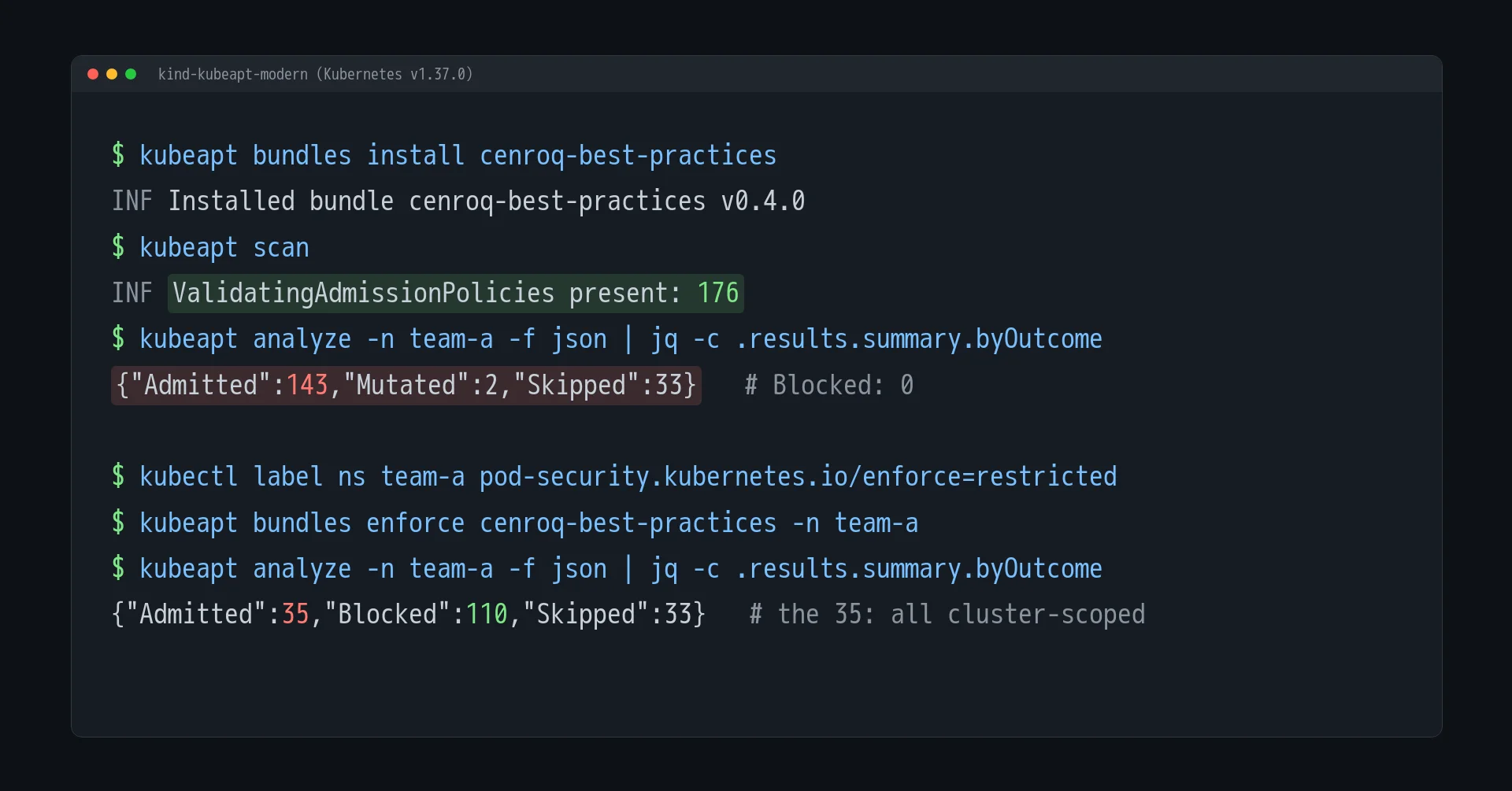
INF ValidatingAdmissionPolicies present: 176
INF No Kyverno/Gatekeeper controllers detected.

$ kubeapt analyze -n team-a -f json | jq -c .results.summary.byOutcome
{"Admitted":143,"Mutated":2,"Skipped":33}
This is the post’s title, and it’s the most important thing KubeAPT taught me: an inventory of policies is not evidence of enforcement. scan’s “present: 176” is accurate. It’s also the number that ends up in a compliance spreadsheet. Without analyze, the only way to know the cluster still accepts all 143 bad objects is to read 528 bindings and every namespace’s labels and work it out in your head. If you’ve read the cloudbeat post, this is the same lesson from the other side: a posture score tells you how configuration compares with a checklist, and a probe tells you what the cluster does when something bad shows up. You want both, and they shouldn’t be confused.
5. Opting a namespace in, and the two snags on the way
KubeAPT has a command for the opt-in label. It failed:
$ kubeapt bundles enforce cenroq-best-practices -n team-a
ERR namespaces "team-a" is forbidden: ValidatingAdmissionPolicy 'namespace-pod-security-standards'
    with binding 'cenroq-best-practices--v0.4.0--namespace-pod-security-standards-namespace-enforce'
    denied request: Namespace must set one of pod-security.kubernetes.io/{enforce,audit,warn}
    to baseline or restricted.
This is the bundle working as designed, in an order the tool doesn’t handle for you. Adding the label is an update to the Namespace object, the Namespace now matches the enforce bindings (it has the label), so the bundle’s own “namespaces must have PSA labels” policy judges the update and rejects it. The fix is to set a Pod Security label first. KubeAPT has a helper for that too:
$ kubeapt bundles enforce pod-security-admission -n team-a --psa-level restricted
INF Set pss.security.cenroq.io/enforce=restricted on namespace team-a
Same error on the next try. Look at the label it set: pss.security.cenroq.io/enforce, not pod-security.kubernetes.io/enforce. The pod-security-admission bundle is cenroq’s re-implementation of the Pod Security Standards as VAPs, with its own label, and it does nothing unless that bundle is installed. The best-practices bundle wants Kubernetes’ native label. Two first-party bundles, two different label conventions for the same idea. Plain kubectl did it:
kubectl label ns team-a pod-security.kubernetes.io/enforce=restricted pss.security.cenroq.io/enforce-
kubeapt bundles enforce cenroq-best-practices -n team-a     # INF Set security.cenroq.io/enforce=enabled
kubeapt analyze -n team-a -f json | jq -c .results.summary.byOutcome
{"Admitted":35,"Blocked":110,"Skipped":33}
110 of 145 blocked. Every one of the 35 still admitted is a cluster-scoped object, one that doesn’t live in any namespace: 15 ClusterRoles, 4 ClusterRoleBindings, both webhook configuration types, an APIService, 9 StorageClasses, a PersistentVolume, a Node, and two Namespaces. That’s step 6.
First, a field worth keying on. Every blocked result says who blocked it:
{"probe":"pod-privileged-containers","policy":"container-privileged",
 "outcome":"Blocked","verdict":"Pass",
 "enforcedBy":{"type":"PodSecurity","name":"restricted:latest",
   "message":"... violates PodSecurity \"restricted:latest\": privileged ..."}}
enforcedBy.type is PodSecurity, not ValidatingAdmissionPolicy. Native PSA runs before the VAPs, and the first rejection wins. Counting across all 110 blocks in team-a:
  84 PodSecurity
  26 ValidatingAdmissionPolicy
In a namespace with enforce=restricted, native Pod Security did three quarters of the pod-level work. That’s not a knock on the bundle; layered controls are the point. But if the question is “is the bundle doing its job,” team-a can’t answer it. Step 7 uses a namespace where it can.
6. Cluster-scoped objects are checked only if they ask to be
Here is the enforce binding for one of those 35, the policy that forbids * wildcards in a ClusterRole:
  name: cenroq-best-practices--v0.4.0--clusterrole-wildcard-rules-cluster-enforce
spec:
  policyName: clusterrole-wildcard-rules
  validationActions: [Deny]
  matchResources:
    objectSelector:                 # not namespaceSelector
      matchExpressions:
      - key: security.cenroq.io/enforce
        operator: In
        values: [enabled]
A ClusterRole has no namespace to carry an opt-in label, so the bundle uses an objectSelector, which matches labels on the object being created. Read that from an attacker’s side: the rule against granting everything applies only to ClusterRoles that volunteer the label. I tested it with the most obvious bad role there is:
kind: ClusterRole
metadata:
  name: totally-normal-operator
rules:
- apiGroups: ["*"]
  resources: ["*"]
  verbs: ["*"]
--- no label:
clusterrole.rbac.authorization.k8s.io/totally-normal-operator created (server dry run)
--- with opt-in label:
The clusterroles "totally-normal-operator" is invalid: ValidatingAdmissionPolicy 'clusterrole-wildcard-rules'
  with binding '...-clusterrole-wildcard-rules-cluster-enforce' denied request:
  Wildcard rules (apiGroups/resources/verbs with "*") are disallowed.
The policy is correct; the binding means it never runs on the objects you’d want it to catch. The policy repo’s own CI tests these cluster-scoped policies with a binding that has no selector at all, which is why the policies themselves pass their tests: the logic is sound, and it’s only the shipped opt-in that changes what reaches it. The docs’ bundles page only describes namespace labels, so a reader setting security.cenroq.io/enforce=enabled everywhere would reasonably believe RBAC was covered. (A side note: those docs are still versioned 1.0.0 under the project’s previous KolTEQ name, while the repo is at v2.2.0 and the docs don’t mention analyze yet.)
How to do better. Write your own Deny bindings for the cluster-scoped policies, with no opt-in. Two things make that safe to do:
-
Find what already violates, so you don’t break the cluster. Kubernetes’ own system roles legitimately need powerful permissions (
cluster-adminis a wildcard role). Herevalidateearns its keep: it evaluates the policies against live objects, ignoring bindings, without enforcing anything:kubeapt validate --bundle cenroq-best-practices --ignore-bindings \ --policy-resources rbac.authorization.k8s.io/v1/clusterroles,rbac.authorization.k8s.io/v1/clusterrolebindings \ --report all -f json66 of the cluster’s 141 existing ClusterRoles and bindings violate at least one policy, almost all of them
system:objects. -
Exclude those by exact name, never by label. My first instinct was to exclude anything labeled
kubernetes.io/bootstrapping=rbac-defaults, the label Kubernetes puts on its own defaults. But a label is chosen by whoever creates the object, so an exclusion by label is the same hole with a different name. Names are different: you can’t create a new ClusterRole calledcluster-admin, because one already exists.
make-cluster-guards.sh does both. For each of 23 RBAC, webhook, APIService, and PersistentVolume policies it reads the policy’s own resource rules, looks up today’s violators from validate, and emits a binding like this:
{"kind": "ValidatingAdmissionPolicyBinding",
 "metadata": {"name": "cluster-guard--clusterrole-wildcard-rules"},
 "spec": {"policyName": "clusterrole-wildcard-rules", "validationActions": ["Deny"],
   "matchResources": {"excludeResourceRules": [{
      "apiGroups": ["rbac.authorization.k8s.io"], "apiVersions": ["v1"],
      "operations": ["CREATE","UPDATE"], "resources": ["clusterroles"],
      "resourceNames": ["cluster-admin", "system:kube-controller-manager",
                        "system:controller:namespace-controller", "...6 more system: roles"]}]}}}
I left out the Namespace, Node, and StorageClass policies on purpose: the StorageClass ones are cloud-specific encryption checks, and the Node and Namespace ones touch objects the kubelet and the control plane update constantly. Those need a human decision, not a script. The result:
$ kubectl apply -f cluster-guards.json
$ kubeapt analyze -n team-a -f json | jq -c .results.summary.byOutcome
{"Admitted":12,"Blocked":133,"Skipped":33}

--- wildcard CR, no label:
... denied request: Wildcard rules (apiGroups/resources/verbs with "*") are disallowed.
--- wildcard CR wearing the bootstrap label:
... denied request ...
The 12 left are exactly the policies I chose not to guard. Then the test that matters for a real cluster: does the control plane still start? Kubernetes re-applies its default roles when the API server boots, so a guard that blocked those updates would show up there. I restarted the control-plane container, waited for the node to report Ready, and checked: every kube-system pod back to Running, and zero “denied request” lines in the API server log.
A few minutes later the guards bit me, which is the point. Testing step 7 needed a ClusterRole that can patch namespaces, and clusterrole-infra-cluster-resources refused to let me create it. The fix was to add that one name to that one guard’s exclusion list, the same reviewable, by-name exception process you’d want in Git.
7. Opt-out labels, and what a “Pass” is credited to
For a clean read on the bundle alone, I made a second namespace, team-b, with native Pod Security set only to warn=baseline (which satisfies the bundle’s namespace rule but doesn’t block anything) and the bundle enforced. Same 133 blocked. Then I counted which policy got the credit for each block:
blocked in team-b: 110; by own policy: 34; by another policy: 76
  47  container-read-only-root-filesystem
  27  initcontainer-image-digest
   2  pod-hostnetwork
Each probe is meant to test one policy, but most probe manifests break several rules at once. The privileged-container probe, for instance, has no seccomp profile, a writable root filesystem, and an unpinned image as well. So a probe’s Pass means “this object was blocked,” not “the policy named on this row works.” For 76 of the 110 pod-level checks, the policy on the row was never exercised. If you want per-policy assurance, the field to key on is enforcedBy.name equal to policy, and the table view doesn’t show it.
That gap is how the per-policy opt-out labels from step 4 hide. I labeled team-b as an operator might when a legitimate workload needs an exception:
kubectl label ns team-b container-privileged.security.cenroq.io/enforce=disabled \
                       privileged-containers.security.cenroq.io/enforce=disabled \
                       container-privilege-escalation.security.cenroq.io/enforce=disabled \
                       pod-template-labels.security.cenroq.io/enforce=disabled
analyze still reported “Runs in Privileged Mode: Pass,” credited to pod-seccomp-profile-restricted. So I wrote a privileged pod that’s tidy everywhere else: non-root user, read-only root, all Linux capabilities dropped, seccomp and AppArmor profiles set (two kernel features that limit what a process may do), a named service account, image pinned by digest. It took four rounds of dry runs to find every other rule it had to satisfy, and then:
$ kubectl create -n team-b --dry-run=server -f priv-pod-tidy.yaml
Warning: would violate PodSecurity "baseline:latest": privileged (container "agent" must not set securityContext.privileged=true)
pod/tidy-but-privileged created (server dry run)
A privileged container (effectively root on the node) admitted into an “enforced” namespace, with a warning nobody reads in CI. In team-a, where native PSA enforces restricted, the same pod was rejected, which is a good argument for running native PSA in enforce mode underneath any bundle.
One more wrinkle when I cleaned up. Removing container-privileged...=disabled wasn’t enough; the pod was still admitted, because the binding honors a second, older key (privileged-containers...) for the same policy. Across the bundle, 119 of the 176 enforce bindings accept more than one opt-out key. An audit has to match the pattern, not a list of policy names:
kubectl get ns -o json | jq -r '.items[] | .metadata.name as $n | .metadata.labels | to_entries[]
  | select((.key | endswith("security.cenroq.io/enforce")) and .value == "disabled") | "\($n)  \(.key)"'
How to do better. The opt-out labels aren’t the problem; exceptions are a fact of life. The problem is who can set them. Plain Kubernetes RBAC can’t say “you may patch this namespace’s labels, except these,” because patch namespaces covers every label. A small VAP can. protect-admission-labels.yaml lets only the platform group add, change, or remove any security.cenroq.io or pod-security.kubernetes.io label on a namespace:
  matchConditions:
  - name: not-platform-team
    expression: "!('kubeadm:cluster-admins' in request.userInfo.groups)"   # your platform group here
  validations:
  - expression: >-
      variables.newLabels.all(k,
        !(k.contains('security.cenroq.io/') || k.startsWith('pod-security.kubernetes.io/'))
        || (k in variables.oldLabels && variables.oldLabels[k] == variables.newLabels[k]))
      && variables.oldLabels.all(k,
        !(k.contains('security.cenroq.io/') || k.startsWith('pod-security.kubernetes.io/'))
        || k in variables.newLabels)
I tested it with ops-bob, a user whose only permission is to patch namespaces (the ClusterRole from step 6’s exception):
--- ops-bob tries the opt-out label:
The namespaces "team-b" is invalid: ValidatingAdmissionPolicy 'protect-admission-labels' ... denied request:
  Admission-control labels on namespaces can only be changed by the platform team.
--- ops-bob tries to remove PSA warn label:
The namespaces "team-b" is invalid: ValidatingAdmissionPolicy 'protect-admission-labels' ...
--- ops-bob sets an unrelated label (should work):
namespace/team-b labeled
--- platform admin sets the opt-out (should work, then revert):
namespace/team-b labeled
namespace/team-b unlabeled
This is also Reality Check 2 in miniature: a clean analyze run is a fact about one moment. One label later, it’s out of date, and nothing tells you.
8. A least-privilege identity
Reality Check 5 says the tool assumes broad read access. To test it, I created the kind of identity a security team often actually gets: a service account with the built-in read-only view role in one namespace.
Setting that up hit the bundle first, which is a fair preview of day-2 life with it enforced. In team-b, creating a ServiceAccount was denied (automountServiceAccountToken must be set to false), and binding the built-in admin role was denied (RoleBindings must not reference powerful roles such as cluster-admin/admin/edit). Both are reasonable rules that will also stop a team’s ordinary onboarding script. I created the auditor in team-a with automountServiceAccountToken: false and a view binding, which the bundle allows, and built a kubeconfig from a short-lived token.
=== scan as namespace reader
ERR namespaces is forbidden: User "system:serviceaccount:team-a:auditor" cannot list resource
    "namespaces" in API group "" at the cluster scope
exit=1

=== analyze as namespace reader
{"total":178,"pass":0,"fail":0,"warn":0,"inconclusive":178,
 "byOutcome":{"Inconclusive":145,"Skipped":33}}   reasons: {"rbac":145}
scan stops at its first call, because listing namespaces is a cluster-wide permission. analyze does exactly what its source comment promised: with no permission to create anything, every probe is Inconclusive with reason rbac, and none of them is a Pass. That’s the right call. Then the CI mode:
$ kubeapt analyze -n team-a --pipeline; echo $?
0
--pipeline exits non-zero only when a probe is Admitted. A pipeline whose token expired, or was scoped wrong, proves nothing and passes. It’s the same failure shape as the copilot in the AI alert triage post: when the check can’t see, the default answer is “fine.” ci-gate.sh wraps it:
jq -e '.results.summary as $s
  | ($s.fail == 0) and ($s.byOutcome.Inconclusive // 0) == 0 and ($s.byOutcome.Error // 0) == 0
    and ($s.pass > 0)' /tmp/analyze.json
pass=0 fail=0 warn=0 inconclusive=178 {"Inconclusive":145,"Skipped":33}
gate exit=1 (namespace reader token)
pass=133 fail=12 warn=0 inconclusive=33 {"Admitted":12,"Blocked":133,"Skipped":33}
gate exit=1 (admin token)
The blind run now fails, and the admin run fails on the 12 cluster-scoped policies I deliberately left unguarded, which is honest. Note that summary.inconclusive includes the 33 Skipped probes, so the gate reads byOutcome.Inconclusive instead.
The gate in the lab files also has a second check, added after the enforcedBy problem from step 2 came to light: any Blocked result without a recognised admission enforcer fails the job. Run against a namespace with a CPU-limit quota on a cluster with no policies installed:
pass=84 fail=61 warn=0 inconclusive=33 unattributed-blocks=84 {"Admitted":61,"Blocked":84,"Skipped":33}
gate exit=1
Those 84 “passes” were the quota talking, not a policy.
For least privilege in practice: analyze needs create on the probed kinds (it never persists anything, but the API server checks create permission before dry-run admission), plus cluster-wide create for the cluster-scoped probes. That’s a sensitive permission set to hand a CI job. Scope it to a dedicated probe namespace and the cluster-scoped kinds you actually test.
9. Tampering with a policy bundle
Reality Check 6 is the big one, so I tested it end to end: what does KubeAPT verify when it downloads a bundle, and what would catch a malicious one?
What the download checks. From internal/cli/bundles.go: fetch the bundle index from bundles.json on the policy repo’s main branch, fetch bundle.json from a GitHub release, take the .tar.gz URL from it, then:
shaURL := sourceURL + ".sha256"
...
if err := verifySHA256(sourcePath, shaPath); err != nil {
The checksum is downloaded from right next to the archive. A SHA-256 checksum proves the bytes you got are the bytes described by the checksum file. When both files come from the same place, anyone who can replace one can replace the other. It catches a corrupted download; it can’t tell you who published it. If that sounds familiar, it’s the same gap as the forged receipt in the proofbundle post and the unsigned “A” grade in the oci-explorer post: integrity is not identity. The bundle’s own metadata even suggests installing with curl -L ... | tar -xz | kubectl apply, which checks nothing at all.
I checked upstream for anything stronger. The release has no signature and no GitHub artifact attestations (signed records of which build produced a file; the attestations API returns 404 for the archive’s digest), and the release is not marked immutable, GitHub’s setting that locks a release’s files once published, so its assets can be replaced after the fact. GitHub does record its own SHA-256 for each uploaded asset, and for cenroq-best-practices_v0.4.0.tar.gz it’s 65e4a017...8757b8, matching what I downloaded.
The tamper. I don’t control cenroq’s GitHub, so I simulated a compromised publisher offline with KubeAPT’s own air-gap feature: bundles export packs an installed bundle into a tarball with a .sha256 sidecar, and bundles import installs one. tamper.sh unpacks it and adds one quiet exemption to every namespace-scoped enforce binding:
    objectSelector:
      matchExpressions:
      - key: app.kubernetes.io/name
        operator: NotIn
        values:
        - node-metrics
Any pod labeled app.kubernetes.io/name=node-metrics, a plausible name for a monitoring agent, skips every one of those checks. It changed 138 bindings, repacked the archive, and regenerated the sidecar, which is all a real attacker would have to do. (My first version only exempted the privileged-container policy, and the test pod was still blocked by the privilege-escalation policy. A real backdoor goes wide.)
One setup snag: KubeAPT ignores XDG_CONFIG_HOME and always uses $HOME/.config/kubeapt, so my first “victim” import went into my real config and refused because the version already existed. Pointing HOME at a clean folder isolated it.
--- 1. tampered archive + regenerated sidecar:
INF Imported bundle cenroq-best-practices v0.4.0 into /lab/supply/victim/.config/kubeapt/...
exit=0
--- 2. same archive, digest pinned out of band:
ERR checksum mismatch for cbp-v0.4.0-evil.tar.gz (expected 1d66d727...0b06195, got 823ed6cb...27b0)
exit=1
The sidecar vouched for the tampered archive. Only a digest from somewhere else, here the one I recorded when I exported the genuine bundle, caught it.
What the backdoor does. bundles install won’t replace an installed version (--overwrite only covers bindings), so: uninstall, install the tampered copy, and try the same privileged pod with and without the magic label in team-b:
--- tampered bundle, team-b:
Warning: would violate PodSecurity "baseline:latest": privileged ...
pod/node-metrics created (server dry run)
--- tampered bundle, team-b, same pod WITHOUT the label:
The pods "node-metrics" is invalid: ValidatingAdmissionPolicy 'container-run-as-nonroot' ... denied request ...
--- tampered bundle, team-a:
Error from server (Forbidden): ... violates PodSecurity "restricted:latest": privileged ...
Admitted with the label, denied without it, and denied in team-a by native PSA, which doesn’t care what the bundle says. Native PSA enforcement under the bundle keeps paying for itself.
Would analyze notice? Running it from the “victim” config failed outright (ERR bundle cenroq-best-practices v0.4.0 ships no probes/ directory), because bundles export packs only bundle.json, the policies, and the bindings, so an air-gapped import can’t run analyze at all. With the probes from my normal download:
$ kubeapt analyze -n team-b -f json | jq -c .results.summary.byOutcome
{"Admitted":12,"Blocked":133,"Skipped":33}
Identical to the honest bundle with step 6’s guards. The probes don’t carry the attacker’s label, so they’re blocked as usual. A behavioral test can only find a backdoor if it happens to send the trigger, and the attacker picks the trigger. So testing behavior doesn’t remove the need to check the configuration itself.
Catching it. My first reach was kubectl diff -f known-good/bindings.yaml, which compares local files with the live cluster. It exited 0, no differences. The reason is useful to know: kubectl diff previews what kubectl apply would change, using a three-way merge, and KubeAPT creates bindings without the last-applied-configuration annotation apply relies on. A field that exists only in the cluster, like the injected objectSelector, looks like something another tool owns, so apply would leave it alone and diff shows nothing. Fine for its job; the wrong tool for “is the cluster exactly what I approved?”
verify-bundle.sh compares specs directly. It renders the known-good YAML, fetches the live policies and bindings, strips the defaults the API server adds (matchPolicy: Equivalent, failurePolicy: Fail, scope: "*", empty selectors; I found these by diffing a clean install until the false positives were gone), and compares object by object:
CHANGED  ValidatingAdmissionPolicyBinding/cenroq-best-practices--v0.4.0--authorizationpolicy-allow-all-namespace-enforce
CHANGED  ValidatingAdmissionPolicyBinding/cenroq-best-practices--v0.4.0--ciliumnetworkpolicy-egress-world-namespace-enforce
...
checked 704 objects, 138 differ
Exactly the 138 bindings tamper.sh touched, with zero false positives. After reinstalling the genuine bundle: checked 704 objects, 0 differ, and the labeled privileged pod was denied again. (kubectl diff still said nothing in both states.) One quirk the script has to handle: bindings carry a bundle=<name> label but the policies don’t, so it can’t find “everything this bundle installed” by label and matches policies by name instead.
The trustworthy install path, then, is: download the archive yourself, record its digest in your own Git repo through a reviewed change (checked against GitHub’s asset digest at the time), and install with the digest pinned:
kubeapt bundles import --from cenroq-best-practices_v0.4.0.tar.gz \
  --checksum 65e4a017650f8c6b2a18effe51829dad96e94d8b2952bf0f3a2631f5c68757b8
That worked with the upstream release archive as-is. Then run verify-bundle.sh on a schedule, because pinning protects the install, not the weeks after it.
10. An older cluster, and a webhook that fails open
To test Reality Checks 3 and 4 I brought up the 1.29.14 cluster, one release before ValidatingAdmissionPolicy reached the stable v1 API:
$ kubectl api-resources | grep -i validatingadmissionpolic
(no ValidatingAdmissionPolicy API served)

=== scan
WRN Error fetching ValidatingAdmissionPolicies: the server could not find the requested resource
...
exit=0
=== bundles install
ERR the server could not find the requested resource
exit=1
scan exits 0 with a warning, so a script checking only the exit code would think the cluster is fine. install fails with Kubernetes’ generic “not found” error and no mention of versions. Meanwhile the bundle’s own compatibility metadata says otherwise:
 158     cenroq.io/kubernetes-version-min: "1.27"
  10     cenroq.io/kubernetes-version-min: "1.29"
   4     cenroq.io/kubernetes-version-min: "1.30"
   4     cenroq.io/kubernetes-version-min: "1.33"
I first read these as a compatibility claim, and they aren’t one. The policy repo’s build script explains the split: the annotations describe the policy content (which CEL features and fields each rule reads), which matters for scanners like validate that evaluate the CEL themselves, while installing is a separate, bundle-wide floor of 1.30, because admissionregistration.k8s.io/v1 only exists from there (1.27 through 1.29 had alpha or beta versions, switched off by default). The repo’s CI tests every policy on each release from 1.30 up. So the practical rule: validate works on older clusters, install needs 1.30. What I’d like is for KubeAPT to say that when the install fails, instead of a generic “not found.”
analyze still ran, since dry runs work on any version: 137 Admitted, 8 Mutated. This time the Mutated results are genuine and interesting:
["pod-apparmor-profile-pod", ["spec.securityContext.appArmorProfile"]]
["pod-violating-hostusers",  ["spec.hostUsers"]]
["pod-procmount-containers", ["spec.containers[0].securityContext.procMount","spec.hostUsers"]]
The 1.29 API server doesn’t know the appArmorProfile field (it arrived in 1.30) and has hostUsers and custom procMount behind feature gates, so it silently drops them. The probe that sets an “unconfined” AppArmor profile isn’t neutralized by a policy; the cluster just doesn’t understand the request. Same probe, same tool, different meaning depending on the version. My patched binary from step 3 still reports all 8 of these, which is what it should do. validate worked unchanged on 1.29 too, flagging the tidy privileged pod from step 7 as [CRITICAL] container-privileged, because it runs the CEL itself.
The webhook section. The Rabbit Hole Generator’s summary said webhook scanning exposes “weak failure policies,” and the grep in step 1 suggested otherwise. On the older cluster (no guards to get in the way), I registered a webhook meant to police pod images, with failurePolicy: Ignore and a backing service that doesn’t exist:
INF [3/3] Inspecting registered webhooks...
╭────────────────────────────────────────────────────────────────────╮
│ Validating Webhook Configurations                                  │
├──────────────┬────────────────────┬────────────────────────────────┤
│ CONFIG       │ WEBHOOK            │ TARGET                         │
├──────────────┼────────────────────┼────────────────────────────────┤
│ image-policy │ images.example.com │ security/image-policy/validate │
╰──────────────┴────────────────────┴────────────────────────────────╯
--- does the webhook actually stop anything?
pod/node-metrics created (server dry run)
scan lists the webhook as if it were a control. It doesn’t show the failure policy, the timeout, or that the target service is missing, and the privileged pod went straight through. The bundle does include policies that reject weak webhook configurations at creation time, and analyze’s probes would catch the privileged pod. But scan’s webhook section is an inventory, the same way its VAP count is.
11. What “a fleet” would cost
Reality Check 1 is about hundreds of clusters. I have two, so I measured one run honestly and did the arithmetic. fleet.sh runs analyze --all-namespaces once per kubeconfig:
modern  ns=7  probes=838  {"Admitted":552,"Blocked":243,"Mutated":10,"Skipped":33}  15s  exit=0
legacy  ns=6  probes=728  {"Admitted":647,"Mutated":48,"Skipped":33}                12s  exit=0
-A sends roughly 110 pod-level probes per namespace plus the cluster-scoped ones once, so 7 namespaces became 838 dry-run requests. The source sets the client to 50 requests per second with bursts of 100, which matches the observed rate of about 56 per second. That gives a rough model: a cluster with 300 namespaces is about 33,000 requests, around 11 minutes at the client’s cap, and 200 such clusters run one after another is well over a day. That’s extrapolation from two kind clusters, not a measurement, and real API servers may throttle harder (each probe is a full admission evaluation). The practical shape is to probe a small set of representative namespaces per cluster (one per enforcement profile), run clusters in parallel from a scheduler that holds the credentials, and keep -A for occasional deep checks. Note the exit=0 on both lines, too: without --pipeline, a fleet job wouldn’t fail on 552 admitted probes.
Where this fits in a real environment
KubeAPT is worth having for one command: analyze. Admission control is a layer where configuration and behavior drift apart easily, and a tool that asks the API server “would you accept this?” with real objects, and tells you which layer answered, is the right shape of evidence. It turned “176 policies present” into “0 blocked” in under a second (lab step 4), and every interesting finding in this post started with an analyze number that didn’t look right. For a platform team adopting native VAPs, the bundles are also a solid, well-documented starting catalog, with a rollout design (warn, then audit, then enforce, per namespace) that won’t take a cluster down on install.
Where it stops being enough is when the question is “can I trust this answer over time?” The cluster-scoped bindings check only objects that opt themselves in (lab step 6), and the namespace opt-outs belong to anyone who can patch a namespace (lab step 7); both need your own guards before the bundle means what it appears to mean. A probe’s Pass is credited to whichever rule fired first, so per-policy confidence needs enforcedBy, not the summary (lab step 7). CI needs a gate that fails on blindness, not just on admitted probes (Reality Check 5). The bundle supply chain needs a pinned digest and a scheduled spec diff, because behavioral probes can’t see a backdoor keyed to a label the attacker chose (Reality Check 6). Older clusters need 1.30 as the floor regardless of what the annotations say (Reality Check 3). And underneath all of it, native Pod Security Admission in enforce mode stopped every privileged-pod trick in this lab that the bundle missed, so treat the bundle as a layer on top of PSA, not a replacement for it.
Actionable Takeaways
- Test admission, don’t inventory it. “Policies present: 176” and “Blocked: 0” were true at the same moment. Run
kubeapt analyze --pipelineagainst a representative namespace in CI and after every policy change. - Read
enforcedBy, not justverdict. A Pass means the object was blocked by something. IfenforcedByisn’t an admission layer, it wasn’t a policy at all; ifenforcedBy.nameisn’t the probe’s own policy, that policy wasn’t tested. - Bind cluster-scoped policies yourself. An objectSelector opt-in on ClusterRoles lets the creator decide whether they’re checked. Write Deny bindings with exceptions by exact name, found with
kubeapt validate --ignore-bindings. - Guard the switches. Use a small VAP so only the platform group can change
security.cenroq.ioandpod-security.kubernetes.iolabels on namespaces, and audit for every*.security.cenroq.io/enforce=disabledkey, not a list of policy names. - Fail CI on blindness. Wrap
analyzeso Inconclusive or zero passes fails the job. An expired token should never look like a hardened cluster. - Pin the bundle, then diff the cluster. Install with
bundles import --checksumagainst a digest you recorded through review, and run a spec diff on a schedule. A sidecar checksum from the same release proves nothing about the publisher. - Keep native Pod Security in enforce mode underneath. It caught every privileged pod the bundle’s opt-outs and my backdoor let through.
Admission control is the cheapest place in Kubernetes to say no, and KubeAPT is a good way to find out whether your cluster actually does.
