Here is a situation that has quietly become everyone’s problem. A vendor ships you a piece of software, and along with it a file called bom.json. It is a Software Bill of Materials, or SBOM: a machine-readable list of every open-source component inside that software, the same way a packaged food lists its ingredients. Regulators now ask for these, procurement teams now demand them, and your own security team now receives them. So the file lands in your inbox. Now what?
Most teams can collect SBOMs. Almost none can act on one. Is this file even well-formed? Does it list the deep dependencies or just the top-level ones? Which of its components have known vulnerabilities, and how urgently do they need answering? Those questions usually get handled by hand, or not at all, and the file goes in a folder nobody opens again.
The Rabbit Hole Generator, my weekly ritual that drops a technical tool on my desk with a 30-minute exercise attached, handed me BomLens this week. It is an open-source tool from SK Telecom that does two jobs from one command: it generates an SBOM from your own code, and it takes an SBOM you received and turns it into an actual risk decision, all on your own machine with nothing sent to a vendor cloud. I pointed it at a deliberately rotten dependency tree, then fed it a good SBOM and a bad one describing the same app. The gap between what the two SBOMs could see is the whole point of this post.
What is BomLens used for in software supply chain security?
BomLens is a local-first SBOM generator and open-source risk assessor. From source code, a container image, a binary, firmware, or an SBOM someone handed you, it produces a CycloneDX SBOM (CycloneDX is one of the two common SBOM file formats, the other being SPDX), an open-source license notice, and a security and license risk report, with Critical and High findings given concrete remediation deadlines. It runs entirely as a local Docker container with no SaaS backend, which makes it usable in regulated, air-gapped, or privacy-sensitive environments where the code cannot leave the network. It is built by SK Telecom under the Apache 2.0 license.
The Architecture: one image, two jobs
The thing to understand about BomLens is that it is not trying to be a raw SBOM emitter like Syft, nor just a vulnerability matcher like Trivy or Grype. It is an orchestration layer that wires those kinds of tools into one opinionated pipeline and normalizes everything into CycloneDX. The design bet is “one Docker image, two jobs”: generate an SBOM from what you build, or assess the risk in what you receive. That second job, validating a third-party SBOM and turning it into findings, is the gap most teams still fill manually.
SBOMs have turned up in this series before, from the producing side: agent-bom generated one to map an AI agent’s blast radius. BomLens is mostly about the other side, the receiving one, and it works a level below a tool like oci-explorer, which scored a container image’s supply chain from its signatures and attestations. BomLens is down at the dependency list itself, the thing those higher-level trust checks assume is already complete and honest.
Under the hood it is a two-stage pipeline, and knowing the stages matters later when we talk about where it struggles.
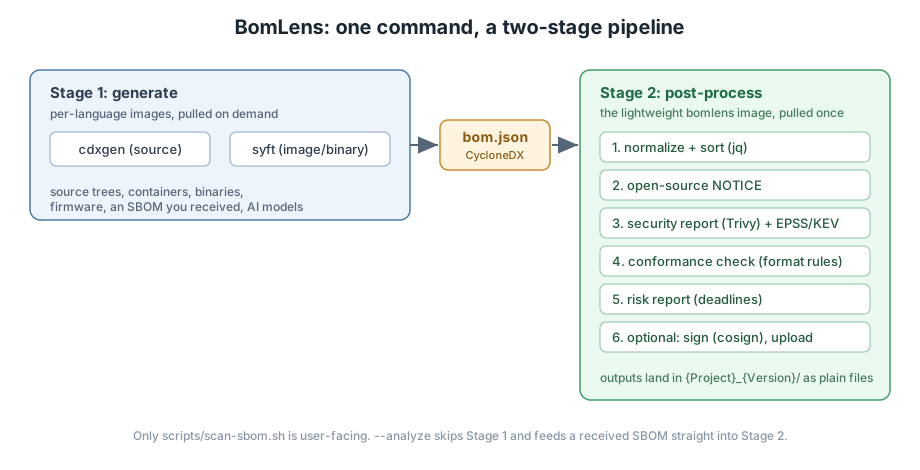
Stage 1 generates the raw SBOM. For source code it pulls the official per-language cdxgen image that matches your project (cdxgen is the component that actually reads a package.json, a pom.xml, a go.mod, and so on, and resolves the dependency graph). For a container image or a binary it uses Syft instead. Stage 2 is the lightweight bomlens image, which takes that bom.json and runs the value-add steps in order: normalize it, generate the license notice, run the Trivy security scan, enrich findings with exploit-likelihood signals, check the SBOM against format rules, and assemble the risk report. The only thing a user ever runs is scripts/scan-sbom.sh. When you hand it a finished SBOM with --analyze, Stage 1 is skipped entirely and your file goes straight into Stage 2.
A note on versions, because this series works through a backlog and the picks are sometimes months old: the Rabbit Hole Generator flagged BomLens back in August. The image I pulled for this lab was built the morning I wrote this (latest-be24805), and the project ships a release every week or two, so treat exact counts below as a snapshot, not a constant.
The Reality Check: where this breaks
BomLens’s pitch is clean, so the Rabbit Hole Generator’s job is to argue the other side. It raised six distinct objections, and a laptop can honestly test more of them than you would expect. I have grouped them as scale failures, built-in assumptions, and one introduced vulnerability, and I note which I actually exercised in the lab and which need a scale a single machine cannot fake.
1. It collapses dependency boundaries at monorepo scale (tested)
BomLens is built around one project context: one --project, one --version, one SBOM. Point it at a repository that holds several distinct services and that structure disappears. I tested this directly (lab step 4 has the method): I built a folder with service-a (depending on an old lodash) and service-b (depending on an old ejs) side by side and scanned the parent. The result was a single SBOM named monorepo with all nine components flattened into one list, lodash and ejs and both their dependency trees mixed together with no line between the two services. For a real monorepo that bundles multiple build systems, generated code, and vendored copies, that one-product framing merges things that belong to different owners and different risk conversations.
2. It is a heavyweight scanner to run across a CI fleet (tested)
“One Docker image” undersells what you actually distribute. The Stage 2 bomlens image I pulled is 1.38 GB across 36 layers, and that is before Stage 1 pulls a second per-language image on demand for each source scan. My first source scan took about two and a half minutes, most of it image pulls, the Trivy database download, and an in-container npm install. Run once on a laptop, fine. Run on every pull request across a fleet of ephemeral CI runners, where each runner cold-starts with no image cache and limited scratch disk, and that cost becomes the bottleneck the Rabbit Hole Generator warned about. BomLens has an answer (pin and pre-load the image, covered in Reality Check 6), but you have to design for it.
3. It produces static artifacts, not a triage system (by design)
Every run writes a folder of files: an SBOM, reports, a notice. There is no deduplication across runs, no suppression workflow for a finding you have already accepted, no asset inventory to correlate against, no ticket that gets opened and closed. At enterprise triage scale you need all of that. This one is not really a bug, because BomLens says so itself: it is a single-machine generator and explicitly hands organization-wide governance to a companion project, TRUSCA, or to Dependency-Track, both of which ingest its CycloneDX output. I did not stand up a triage platform for a 30-minute lab, so I am taking the design at its word here rather than claiming to have tested it.
4. It assumes Docker is available, and “local” still reaches the network (partly tested)
BomLens needs a local Docker engine, which rules out locked-down build runners, rootless Kubernetes jobs, and some air-gapped hosts. That part is simply true. The subtler issue is the “local-first” label. Your code and SBOM never leave your machine, which is the promise that matters for regulated environments. But I watched the scan reach out anyway: the vulnerability enrichment pulls EPSS and CISA KEV data (more on those in lab step 2), and the Trivy database itself is downloaded, not baked into the image. On a truly offline network, the docs are honest that the security step comes back empty with a ScanError rather than a clean bill of health, though you can disable the online lookups with SECURITY_ENRICH=false and still get everything else. “Local-first” is a data-sovereignty claim, not an “it works unplugged” claim, and the distinction is worth knowing before you promise your security team either one.
5. It assumes CycloneDX plus enrichment equals dependency truth (partly tested)
BomLens treats a normalized CycloneDX document as the truth about what is in your software. That assumption frays wherever provenance is weak: stripped binaries, firmware, vendored C code with no package manager, AI model artifacts. I only exercised the source-code path, so I cannot speak to firmware from experience. But I saw the assumption wobble even on plain source. My test app pinned its direct dependencies but shipped no lock file, and BomLens said so plainly in its own report: the versions in the SBOM are “what a fresh install resolves at scan time, not necessarily the versions that were used.” In other words, scan the same repo next week and the transitive versions, and the vulnerability count, can move. The honesty is a point in its favor; the lesson is that an SBOM is a snapshot of a resolution, not a fact of nature.
6. Introduced vulnerability: you are running a privileged scanner over your source (mitigable)
This is the one a security audience should care about most. To use BomLens you pull a prebuilt container image and give it read access to your source tree, your build outputs, maybe your firmware. That concentrates risk in the integrity of that image and everything bundled inside it. A poisoned scanner image is a supply-chain attack with a perfect vantage point. The trust-but-verify path exists and I confirmed the pieces: every BomLens release is signed with keyless cosign (the Sigstore project’s signing tool, which proves an artifact was built by this repository’s own CI without you having to trust a hand-delivered key, the same signing idea behind proofbundle’s offline signed receipts earlier in this series), the image carries provenance labels pointing back to its source commit, and you can pin the scanner by digest with SBOM_SCANNER_IMAGE and even run fully offline from a saved image tar. By default the container only mounts the directory you are scanning; exposing the whole host with --mount / is an explicit opt-in. None of that is automatic. You have to actually verify the signature and pin the digest, the same way you would for any tool you hand your source to.
The 30-Minute Lab: validating a supplier’s SBOM
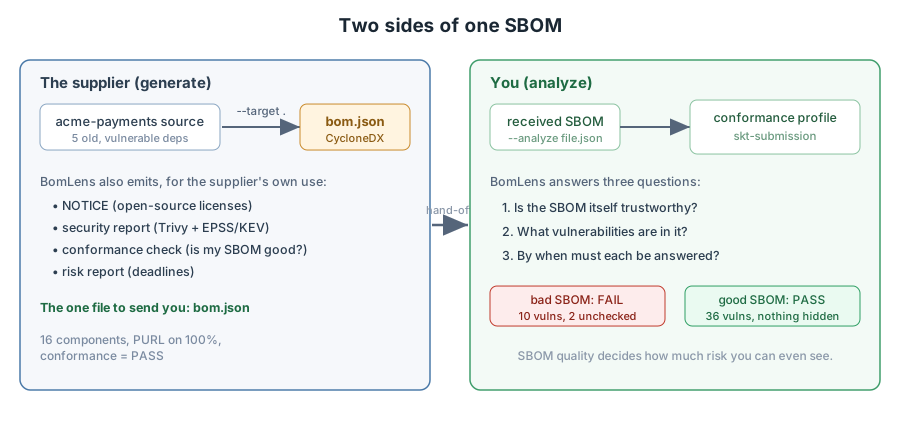
The goal: play both sides of the handoff. First be the supplier and generate an SBOM from a deliberately vulnerable app. Then be the receiver and use --analyze to decide whether that SBOM, and a worse one, can be trusted. Everything you need to rebuild this is in the post bundle: start with README.txt, and run.sh runs every step below in order.
1. Setup and how the lab is wired
You need Docker running. Then clone the repo (for the one wrapper script you call) and pull the scanner image:
git clone --depth 1 https://github.com/sktelecom/bomlens.git
docker pull ghcr.io/sktelecom/bomlens:latest
The lab itself is deliberately low-ceremony, because that is how BomLens is meant to run and I wanted to see the honest version. There is no custom network and no multi-container topology. You run scan-sbom.sh from a working folder, the wrapper mounts that folder into the scanner container, and every run drops its outputs into a {Project}_{Version}/ subfolder right there. So the whole lab is three things sitting in one directory: an acme-payments/ source app, a hand-written vendor-sbom.json, and the cloned bomlens/ repo next to them. Two fixture shapes are chosen on purpose, and both pay off later. The app pins its dependencies to old versions but ships no lock file, which is what lets me show that an SBOM is a snapshot of a resolution rather than a fixed fact (Reality Check 5). The vendor-sbom.json is broken in three specific, common ways, which is what makes the validation step in step 4 land.
A setup nuance worth knowing before you wonder what is happening: that first source scan is slow and mostly silent. The wrapper pulls a second, per-language cdxgen image, runs a dependency install inside the container, and downloads the Trivy vulnerability database, all before you see a result. On my machine the first run took about two and a half minutes with nothing much on screen for most of it. That is normal. It is not hung.
2. Be the supplier: generate an SBOM from source
My stand-in “supplier” is a tiny app, acme-payments, whose only interesting feature is that it pins five dependencies to old, known-vulnerable releases on purpose:
{
  "name": "acme-payments",
  "version": "2.3.0",
  "license": "MIT",
  "dependencies": {
    "lodash": "4.17.11",
    "minimist": "1.2.0",
    "axios": "0.21.1",
    "node-fetch": "2.6.6",
    "ejs": "3.1.6"
  }
}
(It ships in the bundle as package.json.txt, not package.json, for a reason that is on-brand for this post: the first time I committed the real file, GitHub’s dependency graph parsed it as a live manifest and Dependabot promptly opened a stack of alerts on my own repo. The deliberately vulnerable fixture worked exactly as designed, just in the wrong place. Rename it back to package.json when you rebuild the lab.)
A real supplier would generate the SBOM they send you with a single command. This is that command (the --supplier flag records who made the product, and --all adds the notice, security, and SPDX outputs):
./bomlens/scripts/scan-sbom.sh --project acme-payments --version 2.3.0 \
  --target acme-payments \
  --supplier "Acme Corp <https://acme.example>" \
  --all --generate-only
The run ends with a summary. The numbers that matter:
[security] generated: ... (total=36, critical=3, high=15, kev=0, unchecked=0)
[risk]     generated: ... (conformance=pass, vulns total=36, crit=3, high=15)
  Components:  16 identified (purl on 100%, license declared on 100% (16 of 16))
Three things to read here, because each one proves something. Components: 16 ... purl on 100% means BomLens resolved the full dependency graph (5 direct plus their transitive dependencies) and every component carries a PURL, a Package URL like pkg:npm/[email protected] that uniquely names a package so a scanner can match it to vulnerabilities. Hold onto “100%”; it is the number that collapses when we switch to the bad SBOM. unchecked=0 means every component had enough identity to be checked against the vulnerability database. And conformance=pass means the SBOM BomLens produced meets the format quality bar, which you would hope, since it made it.
The real payoff is the risk report. The full table lists all 36 findings; here are the three Critical ones it put on a clock:
| Severity | CVE | Package | Installed | Fixed | Deadline |
|---|---|---|---|---|---|
| CRITICAL | CVE-2022-29078 | ejs | 3.1.6 | 3.1.7 | within 7 days |
| CRITICAL | CVE-2019-10744 | lodash | 4.17.11 | 4.17.12 | within 7 days |
| CRITICAL | CVE-2021-44906 | minimist | 1.2.0 | 1.2.6 | within 7 days |
This is the part that makes an SBOM actionable instead of decorative. Each finding names a CVE (a Common Vulnerabilities and Exposures identifier, the industry’s unique name for a specific flaw), the exact fix version, and a deadline. BomLens applies a simple policy by default: Critical findings get 7 days to a remediation plan or a written risk justification, High findings get 30 days, everything else is “per policy.” The ejs one, CVE-2022-29078, is a template-injection flaw that leads to remote code execution (RCE), an attacker running their own code on your server. That is the kind of finding a 7-day clock is for.
BomLens also enriches each finding with two signals that help you rank even the Criticals against each other. EPSS (the Exploit Prediction Scoring System) estimates the probability a vulnerability will be exploited in the wild in the next 30 days. CISA KEV (the Known Exploited Vulnerabilities catalog) is a list of flaws that are being exploited right now. One small battle here: the scan prints [security] enriching with EPSS + CISA KEV, but if you go looking for those scores in security.json you will not find them. The raw file is a plain Trivy report; the enrichment lands in a sibling security_epss.json keyed by CVE, and both feed the risk report. For my three Criticals, EPSS put the ejs RCE highest at about 0.33, with the two prototype-pollution bugs near 0.05, and none were in KEV. The read: all three are Critical by severity, but if you can only pick up one this morning, the data says start with ejs, and the absence from KEV means none is an active-fire emergency. That is the difference between a list and a priority.
(An aside on drift, since this is “My Battles With Technology”: the generator’s original exercise shipped a hand-written jq script to parse the findings out of a flat severity/id JSON shape. The real security.json is a nested Trivy report, so that script would find nothing. It does not matter, because BomLens already writes the clean risk-report.md table above. The lesson is to read the tool’s actual output format before writing a parser against what you assumed it was.)
3. Be the receiver: validate a good SBOM
Now flip roles. You have the SBOM; you want to know if you can trust it. The --analyze mode takes an existing SBOM instead of scanning source, and the --conformance-profile skt-submission flag applies SK Telecom’s strict supplier-submission rules: 100% PURL coverage, no untraceable identifiers, real transitive dependencies. As a baseline, feed BomLens’s own output back to it:
./bomlens/scripts/scan-sbom.sh --project acme-received-good --version 2.3.0 \
  --analyze acme-payments_2.3.0/acme-payments_2.3.0_bom.json \
  --conformance-profile skt-submission --generate-only
[validate] CycloneDX -> result=pass (mandatory fails=0, warns=7)
  Components:  16 identified (purl on 100%)
It passes, even under the strict profile. The conformance report is detailed enough to be useful on its own: it maps each check to a regulatory baseline, including the EU Cyber Resilience Act’s BSI TR-03183-2 data fields and the 2026 CISA SBOM minimum elements, so a pass is also a rough compliance-readiness signal. A clean SBOM is the easy case. The reason you run this step is the next one.
4. The bad SBOM, and the risk it hides
Here is what a real supplier SBOM often looks like: generated by some half-configured tool, technically a CycloneDX file, and quietly broken. I hand-wrote vendor-sbom.json to describe the same acme-payments app with three very common defects: axios has no PURL at all, node-fetch carries a useless pkg:generic/... identifier instead of a real one, and the file lists only direct dependencies with no transitive graph. Analyze it the same way:
./bomlens/scripts/scan-sbom.sh --project acme-received-bad --version 2.3.0 \
  --analyze vendor-sbom.json \
  --conformance-profile skt-submission --generate-only
[validate] CycloneDX -> result=fail (mandatory fails=3, warns=16, untraceable=1)
[security] generated: ... (total=10, critical=3, high=3, unchecked=2)
The conformance check fails on exactly the three things I broke, and names them:
- PURL coverage (>= 100%): 80% (4/5) because axios has no PURL.
- Traceable PURL (no pkg:generic): 1 untraceable because node-fetch used
pkg:generic. - Transitive dependencies (graph edges): 0 because I listed only the top level.
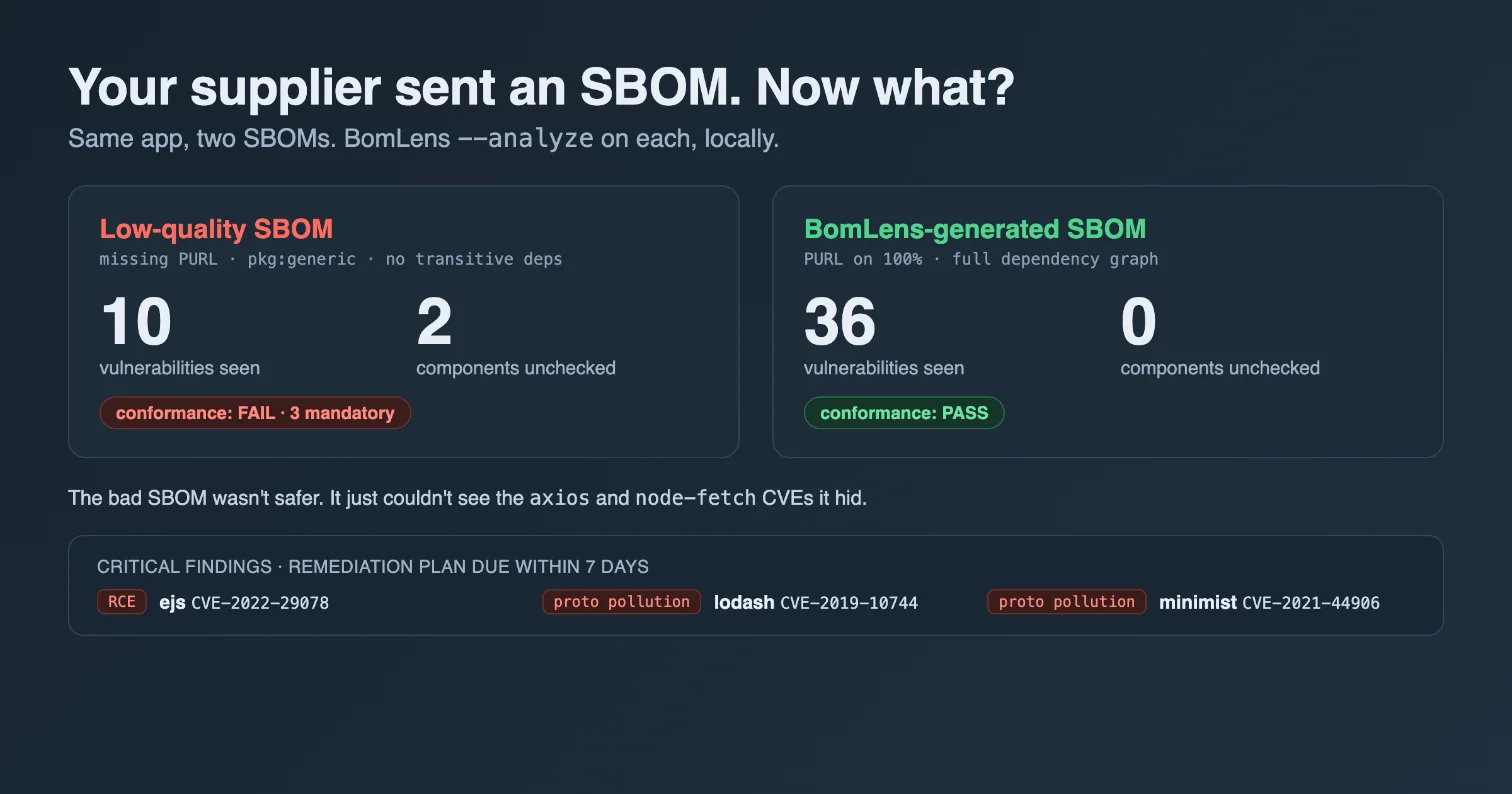
But the conformance verdict is not the scary part. Look at the vulnerability counts: the bad SBOM surfaced 10 findings. The good SBOM of the identical app surfaced 36. A worse-quality SBOM did not describe a safer app. It described the same app and hid 26 vulnerabilities.
The report tells you exactly why, in a field called UncheckedComponents:
{ "Count": 2, "Components": [
  { "Name": "axios",      "PURL": "",                          "Reason": "no-identifier" },
  { "Name": "node-fetch", "PURL": "pkg:generic/[email protected]", "Reason": "no-identifier" }
]}
This is the single most important thing to key on when you receive an SBOM, so it is worth saying plainly. A vulnerability scanner matches on identifiers. No PURL, or a pkg:generic placeholder, means the component cannot be matched, so it reports zero vulnerabilities, which looks identical to “safe.” Axios 0.21.1 was the single most vulnerable component in the good scan, carrying roughly twenty of the 36 findings. In the bad SBOM it had no identifier, so it silently contributed nothing, plus every transitive dependency was missing outright. The unchecked=2 count is the tell: it is not that those components are clean, it is that nobody looked. Cross-reference this with Reality Check 5: an SBOM is only as truthful as its identifiers, and conformance checking is how you catch a lie of omission before you trust the vulnerability totals underneath it.
The monorepo behavior from Reality Check 1 is quick to reproduce in this same setup: put two sub-projects with their own package.json files under one folder, run a normal --target scan on the parent, and read the resulting bom.json. You will get one flat component list with both trees merged and no service boundary. Worth a look so you know what BomLens does, and does not, keep separate.
5. Gate a pipeline on the result
Reports are for humans; a CI pipeline needs an exit code. BomLens has two gates, and I confirmed both return the documented codes. The first fails the build when the received SBOM is not trustworthy enough to act on:
./bomlens/scripts/scan-sbom.sh --project gate-conf --version 1 \
  --analyze vendor-sbom.json --conformance-profile skt-submission \
  --fail-on-conformance --generate-only
# [ERROR] Conformance check failed. ... ; exit code 2
The second fails the build on severity, regardless of SBOM quality:
./bomlens/scripts/scan-sbom.sh --project gate-vuln --version 1 \
  --analyze acme-payments_2.3.0/acme-payments_2.3.0_bom.json \
  --fail-on vulnerability=high --generate-only
# [ERROR] --fail-on vulnerability=high: 18 finding(s) at HIGH or worse ; exit code 4
Exit 2 for a conformance failure, exit 4 for a severity threshold met (3 Critical plus 15 High is the 18 “at HIGH or worse”). Those distinct codes let a pipeline react differently to “this SBOM is junk, reject it” versus “this SBOM is fine and the news in it is bad.” One honest wrinkle I hit: when I fat-fingered a path so the SBOM file did not exist, the run still exited 0. A missing input reading as success is the kind of thing that would quietly neuter a gate, so pin your paths and check that the scan actually ran.
6. Don’t just trust the tool: cross-check a finding
BomLens’s vulnerability data comes from Trivy. Before I repeat a tool’s claim in a post, I like to confirm it against a source that shares none of its code, so I asked OSV.dev, Google’s open vulnerability database, about the headline lodash finding directly:
curl -s -X POST 'https://api.osv.dev/v1/query' \
  -d '{"package":{"ecosystem":"npm","name":"lodash"},"version":"4.17.11"}'
OSV independently confirmed it: CVE-2019-10744 (prototype pollution) affects lodash below 4.17.12, which is exactly the installed version and fix version BomLens reported. I checked the ejs RCE the same way and it lined up too. This step matters because the entire value of an SBOM workflow rests on the vulnerability match being correct; if the tool and an independent database disagree, you want to find out before you have opened a 7-day remediation ticket on a false positive, or closed your eyes to a real one. They agreed, which is the boring, reassuring outcome you want from a cross-check.
Where this fits in a real environment
BomLens is at its best in a specific, common spot: you are a mid-sized team that has to produce an SBOM for a customer or regulator and consume the ones your suppliers send, you want it reproducible in CI, and you cannot or will not ship your source to a vendor SaaS. For that, one signed, pinnable container that emits a CycloneDX SBOM, a license notice, and a deadline-stamped risk report from the same scan is a genuinely good deal, and the --analyze validation of inbound SBOMs is the part I would actually adopt tomorrow.
It stops being enough at the boundaries its own design draws. Across a large CI fleet you have to engineer around the image weight (Reality Check 2). Across a real monorepo you will fight the single-product framing (Reality Check 1). And the moment you need cross-team triage, suppression, and ticketing, you have outgrown a file-per-run tool and should push its output into a platform like Dependency-Track or TRUSCA (Reality Check 3), which is precisely what BomLens tells you to do. Treat it as an excellent scan-and-report engine, not an org-wide program, and it holds up well.
Actionable Takeaways
- Validate an SBOM before you trust its vulnerability count. A clean scanner report on a low-quality SBOM is not good news; it often means components could not be matched. Run a conformance check first and watch the
uncheckedcount. - PURL coverage is the number that matters. No identifier means no vulnerability match, which is indistinguishable from “safe.” Demand real PURLs and transitive dependencies from suppliers, and fail a pipeline on
--fail-on-conformancewhen they are missing. - Rank with EPSS and KEV, not just severity. When everything is Critical, exploit-likelihood data tells you what to touch first. BomLens surfaces both for free.
- If you run a scanner over your source, pin and verify it. Check the cosign signature and pin the image by digest. A scanner has a privileged view; treat its supply chain the way you want suppliers to treat theirs.
An SBOM is not a security control. It is a question, and the quality of the SBOM decides how much of the answer you are allowed to see.
