
Feeling overwhelmed by AI? Learn the Centaur Mindset. Read More →
A digital rabbit made of glitching code and binary dissolves into a Matrix-style tunnel of green cascading numbers, descending toward a glowing terminal at the bottom of the rabbit hole

Zero Learning Mode: Building the Rabbit Hole Generator

Every post in this series starts the same way: I open Notion on a Friday and there’s a tool waiting for me that I didn’t pick. That’s on purpose, and it took me building an actual automation to get there. For a long time before this series existed, I was stuck in what I’d call zero learning mode. I like learning new things, genuinely, but I’d sit down with time set aside and just… not know what to point it at. Too many options, no filter, no momentum. I wasn’t short on curiosity, I was short on a starting point. So I built one: an n8n workflow that picks a tool for me every week, does the research, and hands me a scoped 30-minute exercise, no decision required on my end except whether to actually do it. ...
September 4, 2026 · 8 min · Scott Algatt
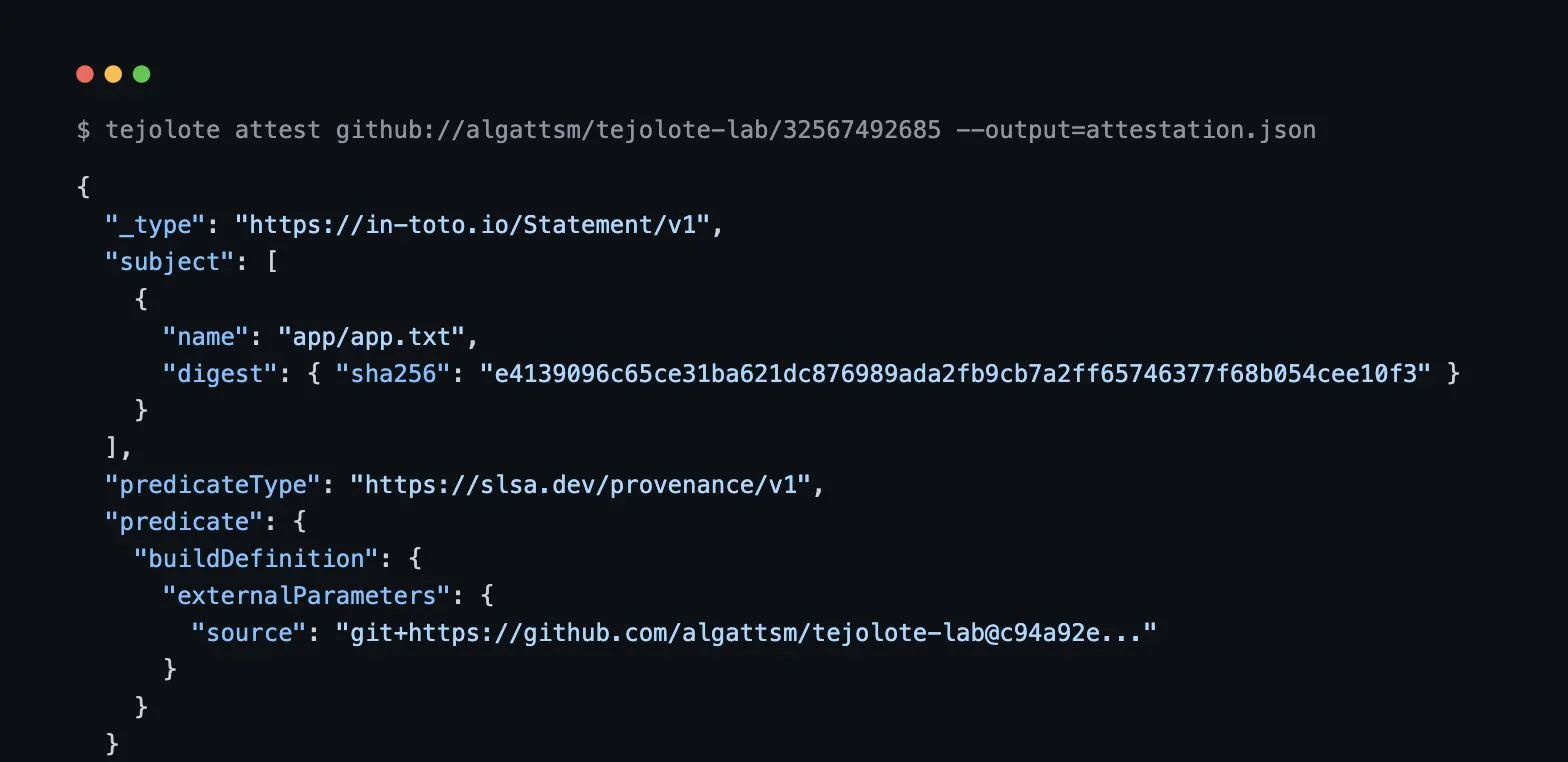
Terminal output showing a real SLSA provenance JSON statement generated by Tejolote from a live GitHub Actions run, with a matching sha256 artifact digest

Provenance From the Outside: Attesting Real Builds with Tejolote

A signature on a piece of software proves someone with a key signed it. It doesn’t prove much about where that software actually came from: what source it was built from, what process built it, or whether anything happened to it between “code written” and “artifact shipped.” Provenance is the term for closing that gap: a verifiable record tying a specific commit, through a specific build process, to a specific output, in a way that’s checkable rather than just asserted. ...

August 28, 2026 · 13 min · Scott Algatt
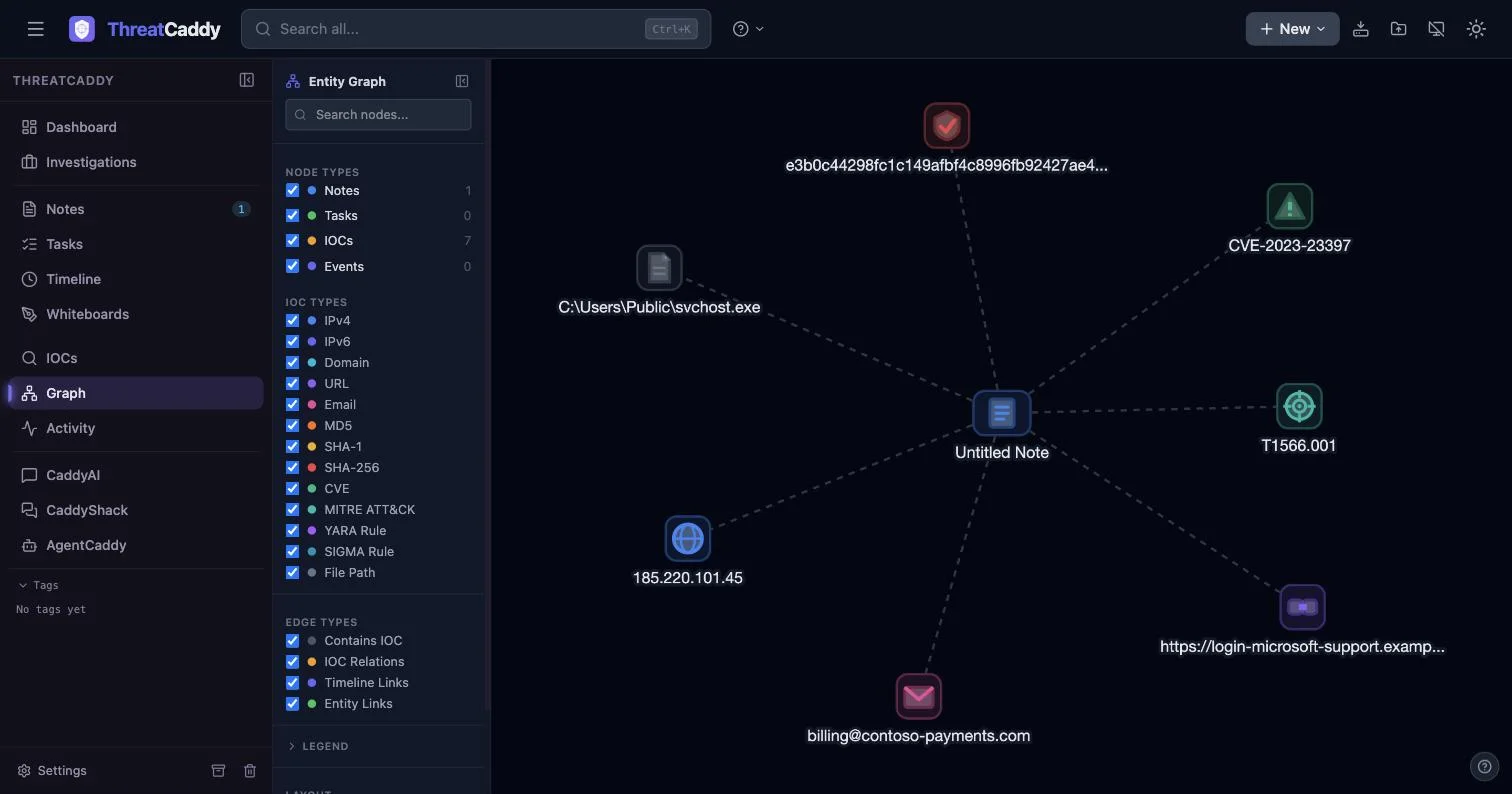
A ThreatCaddy entity graph showing a note connected to seven auto-extracted IOCs: an email, URL, IPv4, SHA-256, CVE, ATT&CK ID, and file path

The Browser Is the Case File: A Local-First Investigation Workspace with ThreatCaddy

Most incident response tooling forces a bad choice on you early in a case. Either you’re in a spreadsheet or a plain notebook with no structure, or you’re setting up a cloud platform with procurement friction, a rigid schema, and a data residency conversation before you’ve even confirmed the phishing email is real. Neither one matches the actual shape of early-stage IR work: messy notes, indicators that need pulling out and tracking, and relationships between them that you don’t know yet. ...

August 21, 2026 · 9 min · Scott Algatt
A complex workflow diagram in the Dify UI showing LLM nodes and tool connections.

Beyond the Prompt: Orchestrating LLM Apps with Dify

Most “agent frameworks” are libraries that push the hard parts of production (orchestration, secrets, versioning, and audit logging) into ad-hoc glue code. As teams move from “chatting with a PDF” to shipping internal copilots, the need for a governed, observable runtime becomes undeniable. This is where Dify enters the stack. It’s a self-hostable “LLM app runtime” designed to turn agentic prototypes into real business services. What is Dify used for in LLM application development? Dify is an open-source LLM application development platform that provides a unified workflow engine, model gateway, and RAG subsystem. It allows developers to model AI applications as explicit directed acyclic graphs (DAGs), enabling governed orchestration of LLM calls, external tools, and retrieval policies with built-in operational telemetry and multi-tenant isolation. ...

May 29, 2026 · 4 min · Scott Algatt

Access Your Kubernetes Cluster from Any Device on Your WiFi -- No VPN Client Required

The Goal I have a DigitalOcean Kubernetes cluster running services like n8n (workflow automation), SearXNG (search), PostgreSQL, and Redis. I also have a Raspberry Pi 5 running OpenWrt as my home router. I wanted every device on my WiFi – laptops, phones, tablets – to be able to access my K8s services directly by ClusterIP, without installing Tailscale (or any VPN client) on each device. The result: my wife can open http://10.245.15.122:5678 on her laptop and hit n8n. My iPad can reach SearXNG. Any device on the WiFi just… works. The OpenWrt router handles the encrypted tunnel transparently. ...

May 22, 2026 · 8 min · Scott