Most REST APIs ship with two kinds of tests: unit tests that check functions in isolation, and integration tests that walk the happy path. “Create an item, read it back, delete it, get a 204.” Those tests are written by the same people who wrote the code, so they test the inputs those people expected. Nobody writes the test that sends a 65-character name, a quantity of 2^64, or a DELETE for an item that was never created, because nobody thought of it.
Fuzzing is the practice of generating huge numbers of unexpected inputs automatically and watching what breaks (OWASP’s overview). It has been standard for file parsers and network protocols for years. REST APIs are harder to fuzz well, because they’re stateful: you can’t read item 42 until something has created item 42, and random bytes thrown at an endpoint mostly bounce off input validation.
The Rabbit Hole Generator picked WuppieFuzz this week, a REST API fuzzer that tries to solve exactly that. It reads the OpenAPI document your API probably already has (the machine-readable description of every endpoint, parameter, and response, defined by the OpenAPI Specification) and turns it into a fuzzing campaign that understands request order. The point for a security or platform reader is simple: you already wrote the map of your attack surface. This tool reads that map and attacks it. What I didn’t expect is how much the quality of that map decides what you get back. My first 60-second run reported 12,165 crashes against a six-route API. Three were real problems. The OpenAPI file explained almost all of the rest.
What is WuppieFuzz used for in API security testing?
WuppieFuzz is an open-source REST API fuzzer from TNO, the Dutch applied research organization, written in Rust and built on the LibAFL fuzzing library. You give it an OpenAPI spec and a running API; it generates sequences of valid-looking HTTP requests, mutates them, and keeps the ones that produce new behavior. It flags server errors, responses that don’t match the spec, and payloads reflected back unescaped, and it can use code-coverage data from the running API (via “coverage agents” for Java, Python, JavaScript, and .NET) to steer toward untested code. It is listed as “Assess” on the April 2026 Thoughtworks Technology Radar and described in a 2026 ICISSP paper.
The Architecture: a fuzzing loop that speaks HTTP
A few terms first, because the fuzzing world has its own vocabulary:
- Corpus: the collection of inputs the fuzzer considers worth mutating further. It starts with a seed set and grows as the fuzzer finds inputs that do something new.
- Mutation: changing an input slightly (flip a value, swap two requests, insert a weird string) to produce a new one.
- Feedback: the signal that tells the fuzzer an input did something new. This is what makes a fuzzer coverage-guided instead of just random.
- Objective: what counts as a finding. Fuzzers call these “crashes” even when nothing crashed; here it often means “the response broke a rule.”
LibAFL is a Rust library that provides those pieces (corpus management, mutation scheduling, feedback, objectives) as building blocks, so a tool like WuppieFuzz can reuse a mature fuzzing engine and focus on the HTTP-specific parts. The diagram below shows how the pieces connect, based on the WuppieFuzz source and the ICISSP paper:
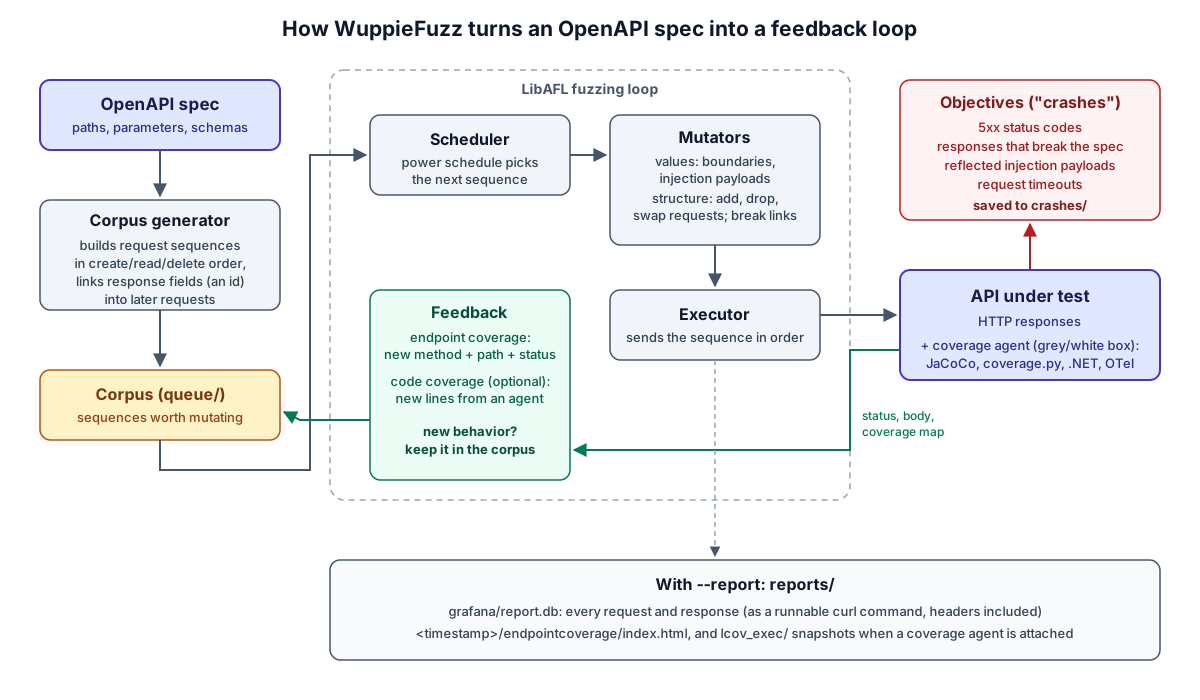
The HTTP-specific parts are where WuppieFuzz earns its keep:
Inputs are request sequences, not single requests. The corpus generator reads the spec, guesses which endpoints relate (it matches parameter names, so the id returned by POST /items probably feeds GET /items/{item_id}), and orders requests the way a real client would: create, then read, then delete. When a response comes back, values from it are plugged into later requests in the same sequence. That’s what lets it reach code behind “item must exist” checks. The v1.8.0 release on October 7 fixed a bug where the corpus never reused values from earlier responses, so this linking is newer than the tool’s reputation.
Mutation happens at two levels. Value mutators change parameters: boundary numbers, wrong types, and, since v1.7.0, injection payloads (SQL, NoSQL, LDAP, path traversal, XXE) generated from small grammars. Structural mutators change the sequence: add, remove, duplicate, or swap requests, and break or re-establish the links between a response and a later request.
Feedback comes in two strengths. Without any instrumentation, WuppieFuzz uses endpoint coverage: a request is interesting if it produced a new combination of method, path, and status code (say, the first 404 ever seen from DELETE /items/{item_id}). With a coverage agent attached to the running API, it also gets code coverage: which source lines the request executed. The paper uses three labels for this. Black-box means the fuzzer only sees what comes back over HTTP. Grey-box means it can watch the compiled program run without having the source. White-box means full visibility into the source. In practice, attaching an agent to an interpreted language like Python gives you line-level, source-mapped coverage, so the lab below is closer to white-box than the “grey-box” name I use for it. I’ll call the agent runs grey-box anyway, because that’s the term the WuppieFuzz README uses for “agent attached.”
Not every corpus entry gets equal time. A power schedule decides how many mutations each sequence gets before moving on; LibAFL’s default, FAST, favors inputs that run quickly or have rarely been picked, on the theory that they lead somewhere new.
Objectives are broad on purpose. A 5xx status is a finding. So is any response that doesn’t match the spec: an undocumented status code, a body that fails the schema, a body where the spec says there shouldn’t be one. So is a suspicious payload reflected back verbatim. That breadth is why a short run can produce thousands of “crashes,” and why the tool also ships a dedup command to cluster them.
The Reality Check: where this breaks
That’s the pitch. Each week the Rabbit Hole Generator also writes a critique of its pick: where the tool fails at scale, which assumptions it quietly depends on, and what security hole it might introduce. The generator happened to pick WuppieFuzz twice, once in June and again in October (the series works through a backlog, so a pick can be months old by the time I write it up), so this section merges both critiques. After removing duplicates there are nine distinct points:
- Points 1 to 4 are about scale and architecture: big specs, asynchronous work, microservices, and instrumentation overhead. I tested 2, 3, and 4 with extra containers. Point 1 needs an API with hundreds of endpoints to test honestly, so I report what a six-route API already showed and stop there.
- Points 5 to 8 are assumptions the design leans on. I tested all four.
- Point 9 is the vulnerability the tool introduces. I tested it, and it’s worse than the critique said.
1. Big specs explode the search space
Every endpoint, parameter, and possible ordering of requests multiplies the space a fuzzer has to explore, and a CI pipeline gives it minutes, not days. I didn’t have a 300-endpoint API to try, but a six-route toy was already instructive: my first run wrote 12,165 crash files in 33 seconds, and a later 60-second run at full speed wrote a 177 MB report database. Volume is a scaling problem before search coverage even is. Lab step 4 shows how dedup collapses the files; the database doesn’t shrink.
2. Asynchronous work hides failures (tested)
When a request queues work and returns 202 Accepted, any failure happens later, in a background worker, off the request path. The fuzzer sees a success. My lab API has an export endpoint built exactly like that. Across three 60-second black-box runs, the worker crashed 18, 48, and 24 times, and every one of those requests looked like a clean 202 to WuppieFuzz. Details in lab step 6.
3. One component’s coverage isn’t the system’s coverage (tested)
In a microservice setup, one API call fans out to several backends. A coverage agent on the front service tells the fuzzer about the front service’s code only. Lab step 7 runs two containers: the agent on the front service reported 91% coverage after two minutes, while the backend’s real coverage was 82%, with the buggy branch never executed.
4. Instrumentation can collapse throughput (tested)
Coverage feedback isn’t free. The Python agent snapshots coverage after every request, and in my lab that dropped throughput from about 4,850 requests per second to 60 to 160. On a target this small, the extra guidance didn’t make up for the lost volume. Lab step 6 has the numbers.
5. The spec is assumed to be accurate (tested)
Everything WuppieFuzz generates comes from the OpenAPI document. A route missing from the spec is never called; a header the spec doesn’t mention is never sent; a response the spec doesn’t describe is flagged as a finding. My lab spec (written by the Rabbit Hole Generator) had all three problems, and they produced 80% of the noise in the first run. See lab steps 4 and 5.
6. Semantic preconditions stay out of reach (tested)
Some code only runs when several conditions line up: a specific enum value and a large quantity and a particular remainder. Coverage guidance rewards a new line only after you reach it, so it can’t pull the fuzzer toward a branch three conditions deep. In lab step 7, the fuzzer sent about 12,000 quotes and never once used the other valid value of a two-value enum.
7. More coverage is assumed to mean more security-relevant exploration (tested)
A coverage number going up feels like progress, but the new lines are often error handlers, serializers, and framework plumbing. In my grey-box runs, coverage climbed to 94% while the one line that crashed the API stayed red in most runs. Coverage is a good map of what hasn’t run; it’s a weak proxy for “we looked for bugs.” See lab step 6.
8. A resettable environment with real credentials is assumed (tested)
WuppieFuzz doesn’t reset the API between sequences (the paper says so), and it will happily call every endpoint in the spec as fast as it can. In 60 seconds, my lab run created 83,083 items and successfully deleted 2,512. That’s fine against a disposable container and a disaster against shared staging. The authentication docs also warn that a logout endpoint in the spec will log the fuzzer out mid-run. And credentials passed as a static header are never mutated, so the “what if I’m not an admin?” path is never tested (lab step 6).
9. Introduced Vulnerability: the report database is a credential store (tested)
With --report, WuppieFuzz records every request and response in a SQLite database that feeds its Grafana dashboard (Grafana is a popular open-source dashboard tool). The critique said that could persist tokens and personal data. It does, and in the most reusable form possible: each request is stored as a ready-to-run curl command with the Authorization header included, and the shareable HTML coverage report embeds the same commands. Lab step 8 shows where the token ended up and a redaction pass that removes it.
The 30-Minute Lab: fuzzing a small, deliberately flawed API
The Rabbit Hole Generator’s challenge, across its two versions, was to fuzz a small deliberately vulnerable API, produce WuppieFuzz’s endpoint-coverage report, and check whether it found a planted 500. I did that, then used the same setup to test the Reality Check points above. Everything ran in Docker containers on a Mac; nothing was installed on the host. It took more than 30 minutes, mostly because of the detours, which are written up where they happened.
All the lab files are in this post’s bundle so you can rebuild it: start with README.txt.
1. Building the lab
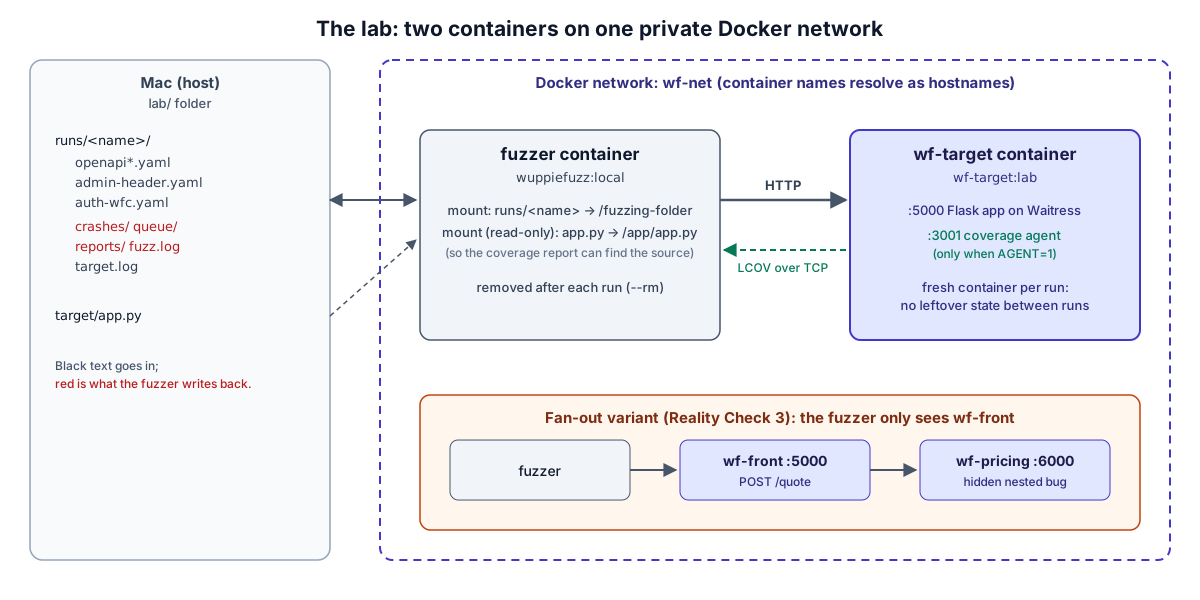
The shape is two containers on one private Docker network. The fuzzer container runs WuppieFuzz, with a host folder mounted so its spec files go in and its crash files and reports come back out. The target container runs the API under test. Docker networks resolve container names as hostnames, so the fuzzer can reach the target at http://wf-target:5000. Each run gets a fresh target container, so no state leaks from one run into the next. That matters later, when runs get compared to each other.
Building WuppieFuzz. There are prebuilt binaries on the releases page and a Homebrew formula, but the README’s container path is the most contained, so I built the image from source:
git clone https://github.com/TNO-S3/WuppieFuzz.git
docker build -t wuppiefuzz:local WuppieFuzz
Three things happened that a reader will hit too:
- It goes quiet for a long time. WuppieFuzz bundles its own copies of SQLite (a single-file database), OpenSSL, and Z3 (Microsoft’s constraint solver, a large C++ project), and compiles all of them. The build printed
Compiling rusqliteand then nothing for several minutes. That’s normal. docker psshows nothing while it builds. Docker’s build engine, BuildKit, runs build steps inside its own daemon rather than as regular containers, so they don’t appear indocker psor Docker Desktop’s Containers tab. The Builds tab in Docker Desktop shows progress.- It failed after 9.5 minutes with
cannot allocate memoryat the very last step. The project’s release profile inCargo.toml(the Rust build settings) uses full link-time optimization, where the compiler re-optimizes the whole program at once in the final step, in a single code-generation unit with debug info. That makes the final link step memory-hungry. Docker Desktop’s VM had 8 GB, and that wasn’t enough.
The fix was already in the project. The same Cargo.toml has a dist profile with “thin” link-time optimization, which is what the project’s own release binaries are built with. My Dockerfile.wuppiefuzz is the upstream Dockerfile with two lines changed:
-RUN cargo build --release
+RUN cargo build --profile dist
 ...
-COPY --from=builder /app/target/release/wuppiefuzz /app/wuppiefuzz
+COPY --from=builder /app/target/dist/wuppiefuzz /app/wuppiefuzz
docker build -f Dockerfile.wuppiefuzz -t wuppiefuzz:local WuppieFuzz
That built in 8 minutes 15 seconds. Raising Docker Desktop’s memory limit would also work.
The target. The first version of the Rabbit Hole Generator’s challenge included a small Flask API (Flask is a lightweight Python web framework), and I kept its core: create, read, and delete items, plus a planted bug where a name longer than 64 characters returns 500. I added two routes so the lab could test Reality Check points:
@app.post('/items')
def create_item():
    global next_id
    data = request.get_json(silent=True) or {}
    name = data.get('name', '')
    if len(name) > 64:
        abort(500, 'simulated parser failure')        # the planted bug
    item = {'id': next_id, 'name': name, 'qty': int(data.get('qty', 0))}
    items[next_id] = item
    next_id += 1
    return jsonify(item), 201

@app.delete('/items/<int:item_id>')
def delete_item(item_id):
    if request.headers.get('X-Admin') != 'true':      # a header the spec never mentions
        abort(403)
    ...

# Async work: the request "succeeds" and the failure happens later, off the request path.
@app.post('/items/<int:item_id>/export')
def export_item(item_id):
    ...
    def work(snapshot):
        time.sleep(0.5)
        if snapshot['qty'] < 0:
            print(f"EXPORT WORKER CRASH: negative qty for item {snapshot['id']}", flush=True)
            raise ValueError('negative qty')
    threading.Thread(target=work, args=(dict(items[item_id]),), daemon=True).start()
    return {'queued': True}, 202

# Undocumented route: exists in the code, missing from openapi.yaml (a stale spec).
@app.get('/internal/debug')
def debug_dump():
    return jsonify({'items': items, 'env': 'lab'})
The export endpoint is there for Reality Check 2: its worker crashes on a negative quantity, but the HTTP response is always 202. The debug route is there for Reality Check 5: it exists in the code but not in the spec. The full file is app.py.
The spec (openapi.yaml) is the Rabbit Hole Generator’s original, with two changes. I added the export route. I also changed the servers URL from http://127.0.0.1:5000 to http://wf-target:5000, because WuppieFuzz sends requests to whatever that field says. Inside the fuzzer container, 127.0.0.1 is the fuzzer itself, not the API.
The target’s Dockerfile also installs WuppieFuzz’s Python coverage agent, which I’ll explain in step 6. It stays switched off unless an environment variable is set, so the same image works for every run. One last setup nuance: the WuppieFuzz README suggests --network host for fuzzing a local service. On Linux that shares the host’s network with the container; on Docker Desktop for Mac it’s a newer, opt-in feature, and a user-defined network is simpler and works the same everywhere.
The run.sh wrapper does one campaign: start a fresh target, run the fuzzer container against it, then save the target’s own log next to the fuzzer’s output. The target log is my independent check on what the fuzzer reports.
2. The first run, and a 33-second campaign
./run.sh blackbox 60 # 60-second campaign, spec only, no coverage agent
The core of what that runs:
docker run --rm --network wf-net -v "$PWD/runs/blackbox:/fuzzing-folder" -w /fuzzing-folder \
  wuppiefuzz:local fuzz --timeout 60 --report openapi.yaml
WuppieFuzz printed a heartbeat line a few times a second:
[Client Heartbeat] run time: 32s, corpus: 4, objectives: 13358, observed crashes: 13358,
  executed sequences: 19115, seq/sec: 579.2, requests: 25920, req/sec: 785.5, coverage: unknown,
  endpoint coverage: 9/10 (90%), current sequence: POST /items -> DELETE /items/{item_id}
ERROR wuppiefuzz::executor] Connection error occurred during communication with the API under test:
  error sending request for url (http://wf-target:5000/items?)
INFO  wuppiefuzz::executor] Requesting shutdown after transport error, is the API (still) running?
Two things jump out. 13,358 objectives in 32 seconds against six routes can’t all be real (more on that in step 4). And the campaign ended at 33 seconds of the 60 I asked for, because the fuzzer lost its connection to the API. The API hadn’t crashed; its log showed it answering requests right up to the end. A second run died the same way after 26,559 requests, a suspiciously similar number.
That pointed at the network, not the code. Flask’s built-in development server (app.run()) answers every request with Connection: close:
docker run --rm --network wf-net curlimages/curl:8.11.1 -sv http://wf-target:5000/health 2>&1 | grep '^<'
< HTTP/1.1 200 OK
< Connection: close
So every request opened a brand-new TCP connection, which uses up one of the fuzzer container’s ephemeral ports: the temporary port numbers the operating system hands out for outgoing connections. After a connection closes, its port sits in a TIME_WAIT state for a while before it can be reused. The container’s range was:
docker run --rm alpine:3.22 cat /proc/sys/net/ipv4/ip_local_port_range
32768 60999
That’s 28,232 ports. At roughly a thousand requests a second, the fuzzer ran out in under 30 seconds, and WuppieFuzz stops the whole campaign on the first transport error rather than retrying. The fix is to serve the app with a production server that keeps connections open. I switched to Waitress, a pure-Python production WSGI server (WSGI is the standard interface between Python web apps and servers):
# Waitress, not app.run(): Flask's dev server sends 'Connection: close', so every
# request burns a fresh client port and a fast fuzzer exhausts them in ~30 seconds.
from waitress import serve
serve(app, host='0.0.0.0', port=5000, threads=8)
After that, every run went the full 60 seconds, at 2,000 to 5,000 requests per second. If your fuzzing campaigns end early with a connection error, check whether the API closes connections after each response before you suspect the API itself.
3. Did it find the planted bug, and did it chain requests?
The endpoint-coverage report is an HTML page under reports/<timestamp>/endpointcoverage/. It lists every documented status code per endpoint and marks whether the fuzzer saw it:
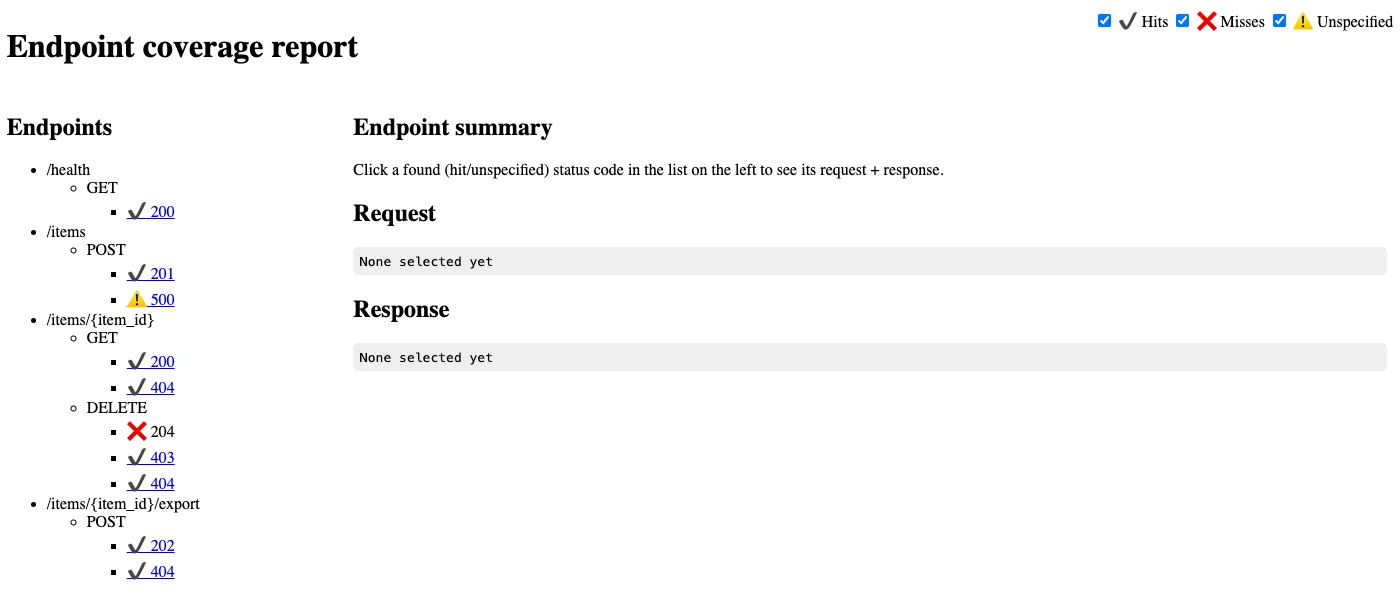
How to read it:
- Green checks are documented responses the fuzzer produced. “Endpoint coverage: 9/10” in the heartbeat means 9 of the 10 documented status codes.
- The red X on
DELETE ... 204is a documented success the fuzzer never achieved. The reason is Reality Check 5 in miniature: deleting requires anX-Admin: trueheader that isn’t in the spec, so the fuzzer had no way to know about it. - The warning on
POST /items 500is a status code the spec doesn’t list. That’s the planted bug: the fuzzer found it, 45 times in 33 seconds.
Clicking a status code shows a sample request and response. To go deeper, everything is in reports/grafana/report.db, a SQLite database. I queried it from a throwaway container with q.sh, which avoids installing sqlite3 on the host:
SELECT q.type AS method, q.path, r.status, count(*) n
FROM requests q JOIN responses r ON r.reqid = q.id GROUP BY 1,2,3;
method  path                     status  n
GET     /health                  200     2508
POST    /items                   201     15151
POST    /items                   500     45
DELETE  /items/{item_id}         403     1413
DELETE  /items/{item_id}         404     1873
GET     /items/{item_id}         200     45
GET     /items/{item_id}         404     3222
POST    /items/{item_id}/export  202     351
POST    /items/{item_id}/export  404     3623
Only 45 of 3,267 reads found a real item, which made me wonder whether the request chaining from the architecture section actually worked. Two checks answered it. First, the most common read was GET /items/0 (1,259 times), followed by IDs like -1, 18446744073709551615, and ' AND 1=2--. The fuzzer was deliberately probing with bad IDs, which is its job. Second, for each successful read I checked whether an earlier POST in the same sequence had returned that exact ID:
SELECT count(*) linked_gets FROM requests g JOIN responses gr ON gr.reqid = g.id
WHERE g.type='GET' AND g.path='/items/{item_id}' AND gr.status=200
  AND EXISTS (SELECT 1 FROM requests p JOIN responses pr ON pr.reqid = p.id
              WHERE p.inputid = g.inputid AND p.id < g.id AND p.type='POST' AND p.path='/items'
                AND g.url LIKE '%/items/' || json_extract(CAST(pr.data AS TEXT), '$.id') || '?');
linked_gets
33
So 33 of the 45 successful reads used an ID taken from a response earlier in the same sequence. Chaining works; the low hit rate is the mutators doing their job. This is the kind of check worth doing on any fuzzer before trusting it: confirm that it reaches the state you think it reaches, using data it didn’t summarize for you.
4. 12,165 crash files, 10 problems
That first run left 12,165 files in crashes/. Each one is a YAML file holding the request sequence that triggered an objective. Nobody is reading 12,165 YAML files, which is why v1.8.0 added dedup: it replays every crash file against a live target, groups them by what actually went wrong (exit kind, status code, validation error, endpoint, response type), and keeps one representative per group:
docker run --rm --network wf-net -v "$PWD/runs/blackbox:/fuzzing-folder" -w /fuzzing-folder \
  wuppiefuzz:local dedup --openapi-spec openapi.yaml --minimize representative --output dedup crashes
Dedup complete: 12165 crash files, 12165 reproduced, 10 unique clusters, 0 non-reproducible, 0 skipped
It took 30 seconds. The clusters, from dedup/clusters.json:
| Files | Status | What WuppieFuzz flagged | Endpoint |
|---|---|---|---|
| 45 | 500 | http_5xx |
POST /items |
| 213 | 201 | ResponseObjectIncorrect |
POST /items |
| 74 | 201 | PossibleInjectionSignature |
POST /items |
| 2,146 | 200 | UnexpectedContent |
GET /health |
| 3,039 | 404 | UnexpectedContent |
GET /items/{item_id} |
| 3,216 | 404 | UnexpectedContent |
POST /items/{item_id}/export |
| 1,873 | 404 | UnexpectedContent |
DELETE /items/{item_id} |
| 1,206 | 403 | UnexpectedContent |
DELETE /items/{item_id} |
| 309 | 202 | UnexpectedContent |
POST /items/{item_id}/export |
| 44 | 200 | UnexpectedContent |
GET /items/{item_id} |
The top three rows are about the API. The bottom seven, 9,833 files or 80% of the total, are about the spec.
The planted 500. The reproduce command replays a crash file and shows the response:
docker run --rm --network wf-net -v "$PWD/runs/blackbox:/fuzzing-folder" -w /fuzzing-folder \
  wuppiefuzz:local reproduce --openapi-spec openapi.yaml dedup/unique/000000_1919b4388be7b3a0
Sending request:
POST /items
 Contents in body: {"name": "���NTIT�TTTTTT�\0\0\0 xxe YOS:EM \"fileeeeeeeeeeeee:///etc��SDEasswd\">", "qty": 0}
...
Response contents printed below:
<title>500 Internal Server Error</title>
<p>simulated parser failure</p>
It also prints a ready-to-paste curl command, which is what you’d hand a developer. One caution when reading these: the payload looks like an XML external entity (XXE) attack, an attempt to make a server read local files like /etc/passwd, because it came from the injection-grammar mutator. But the API doesn’t parse XML. The 500 happened because the string is longer than 64 characters, nothing more. Minimization didn’t shorten it either, because dedup --minimize removes unnecessary requests from a sequence, not unnecessary characters from a value; the paper lists parameter minimization as future work. Before writing up a finding, work out which part of the payload actually mattered.
A real bug I didn’t plant. The 213 ResponseObjectIncorrect files have a representative like this:
- method: POST
  path: /items
  body:
    ApplicationJson:
      name: !String '&'
      qty: !Number 16824285697276284507
The API accepted a quantity larger than the biggest 64-bit integer and echoed it back. Python’s integers have no size limit, so nothing failed on the server. But most JSON consumers, like Go, Java, or JavaScript code using standard number types, can’t represent that value, and will either error out or silently round it. The spec said integer; WuppieFuzz validated the response against the spec and flagged it. I wouldn’t have written that test.
The reflected payload. The 74 PossibleInjectionSignature files sent names like *)(cn=*, an LDAP injection string (LDAP is the directory protocol behind many corporate logins, and this string tries to turn a lookup into “match everyone”). The API returned it verbatim in its JSON response. For this API that’s not an exploit: it doesn’t query LDAP, and JSON responses aren’t rendered as HTML. But the check is a useful tripwire. The same reflection from an endpoint that builds an HTML page or a directory query is exactly how injection bugs start.
The other 9,833. UnexpectedContent means “the response had a body, but the spec doesn’t say this response has a body.” The Rabbit Hole Generator’s spec lists status codes like '200': {description: ok} without a content section, so every response with a body broke the contract. That’s Reality Check 5: a spec that’s accurate enough for documentation can still be too vague for a fuzzer.
5. Fixing the spec, and what fixing can’t fix
So I wrote the spec I should have started with, openapi-fixed.yaml: JSON schemas for every success response, int64 formats on the integers, and the HTML error pages Flask actually returns declared as text/html. I also gave the fuzzer two files:
- admin-header.yaml contains
X-Admin: "true", passed with--header. Static headers are added to every request and never mutated, which is how you supply something the spec doesn’t describe. - auth-wfc.yaml contains a fake bearer token, passed with
--authentication. The API ignores it. It’s there so step 8 can follow where a credential ends up. The file uses the Web Fuzzing Commons format, a community standard for describing API logins that WuppieFuzz supports.
SPEC=openapi-fixed.yaml ./run.sh fixedspec 60 --header admin-header.yaml --authentication auth-wfc.yaml
That run sent 119,131 requests and the DELETE ... 204 was hit 1,428 times, so the header worked. Deduplicating the crashes gave 6 clusters instead of 10, but over 30,000 files were still UnexpectedContent, all on 404 responses that the spec now explicitly declared as HTML.
The source explained why. In src/openapi/validate_response.rs, the validator looks for an application/json media type on the documented response; if there isn’t one, any body counts as unexpected content. Declaring text/html doesn’t help. WuppieFuzz assumes a JSON-everywhere API, and Flask’s default error pages (like many frameworks’) aren’t JSON. You can fix that in the API, by returning JSON errors, which is good practice anyway. Or you can tell WuppieFuzz to stop counting it, with --crash-criteria. The flag takes the names listed in wuppiefuzz fuzz --help, written exactly as shown (Status5xxNotSpecified, not status5xx-not-specified), and is repeated once per criterion. campaign.sh passes every criterion except UnexpectedContent. With that, a 60-second run produced 1,135 objectives instead of 35,351.
6. Black-box versus grey-box
Now the comparison the tool is built around: does code-coverage feedback find more?
Setting up the coverage agent. WuppieFuzz’s Python agent lives in a separate repository, WuppieFuzz-Python. In the main repo it’s a git submodule, so a plain git clone leaves coverage_agents/python/ empty; clone with --recurse-submodules or fetch it directly. The agent is a single sitecustomize.py file. Python runs any file by that name automatically at startup, which lets the agent start coverage.py (the standard Python coverage library) inside the API process without any code changes. My target Dockerfile downloads it at a pinned commit:
FROM python:3.11-slim
RUN pip install --no-cache-dir flask==3.1.2 waitress==3.0.2 coverage==7.2.7
WORKDIR /app
# WuppieFuzz's Python coverage agent, pinned to a commit. It only activates when
# COVERAGE_PROCESS_START is set, so the same image runs with or without it.
ADD https://raw.githubusercontent.com/TNO-S3/WuppieFuzz-Python/0a0728f5ca79c3a526af73e6a0666dfa6175c785/sitecustomize.py /usr/local/lib/python3.11/site-packages/sitecustomize.py
COPY app.py coveragerc ./
CMD ["python", "-u", "app.py"]
The nuances, in the order I hit them:
- Pin
coverage==7.2.7. The agent reaches into coverage.py’s internal classes, and its README pins that version. Internals change between releases, so don’t let pip pick the latest. - It only switches on with
COVERAGE_PROCESS_STARTpointing at a coverage config file (coveragerc, which tells coverage.py to ignore the agent and the standard library). Every Python process that loads thatsite-packagesfolder runs the file, so keep it in a dedicated image rather than a shared Python install. - It listens on port 3001 on all interfaces, with no authentication. Anyone who can reach that port can pull your coverage data. Fine on a private Docker network; don’t publish that port in a shared staging environment.
--coverage-hostaccepts a hostname (wf-target:3001), but resolves it once at startup, so the target container has to be running before the fuzzer starts.--reportwith an agent requires--source-dir, and it has to match the path the agent reports, which here is/app/app.py, the path inside the target container. The fuzzer image keeps its own binary at/app/wuppiefuzz, so mounting the source folder over/appwould hide the fuzzer. Mount the single file instead:-v "$PWD/target/app.py:/app/app.py:ro".- The run ends with
No such file or directory (os error 2). That isn’t about your source path. To build the HTML coverage report, WuppieFuzz runs thelcovandgenhtmlprograms from the LCOV project, and the upstream Docker image doesn’t include them. The raw per-request coverage is still saved underreports/<timestamp>/lcov_exec/, and lcov-report.sh builds the HTML report in a throwaway Debian container.
The grey-box run adds three flags to the same campaign:
AGENT=1 SPEC=openapi-fixed.yaml ./run.sh greybox 60 "${args[@]}" \
  --coverage-format lcov --coverage-host wf-target:3001 --source-dir /app
The log confirms the agent connected:
Coverage guidance: endpoint coverage plus source-code coverage
Initial code coverage: 20/49 (41%)
The comparison. One run of each proves little, because fuzzing is random. I ran three 60-second campaigns of each configuration against a fresh target each time, with the same spec, header, token, and crash criteria:
| 60s each, 3 runs | Black-box | Grey-box (agent attached) |
|---|---|---|
| Requests sent | 318,177 to 330,293 | 3,985 to 5,794 |
| Planted 500 hits | 53 to 179 | 1, 1, 0 |
| First 500 at | 0 to 4 seconds | 3 s, 49 s, never |
| Async worker crashes triggered | 18 to 48 | 0 |
| Code coverage | unknown | 44 to 45 of 49 lines |
Then one 5-minute grey-box run: 46,551 requests, 46 of 49 lines covered, zero hits on the planted 500, and 4 async worker crashes. That’s Reality Check 4: the agent asks coverage.py for a full coverage snapshot after every request, and throughput fell from thousands of requests per second to around a hundred. On a six-route API, sheer volume wins; the black-box fuzzer finds the long-name bug within seconds just by trying lots of names. The paper’s own benchmark lands in a similar place: on the Petstore demo API, white-box mode reached endpoints slightly faster, but “the coverage achieved by both approaches is the same.” Where coverage guidance should pay off is a large API with deep code paths, where random volume stops reaching new code. I couldn’t test that honestly here.
What the agent does give you is the coverage report itself, and that turned out to be the most useful artifact of the lab:
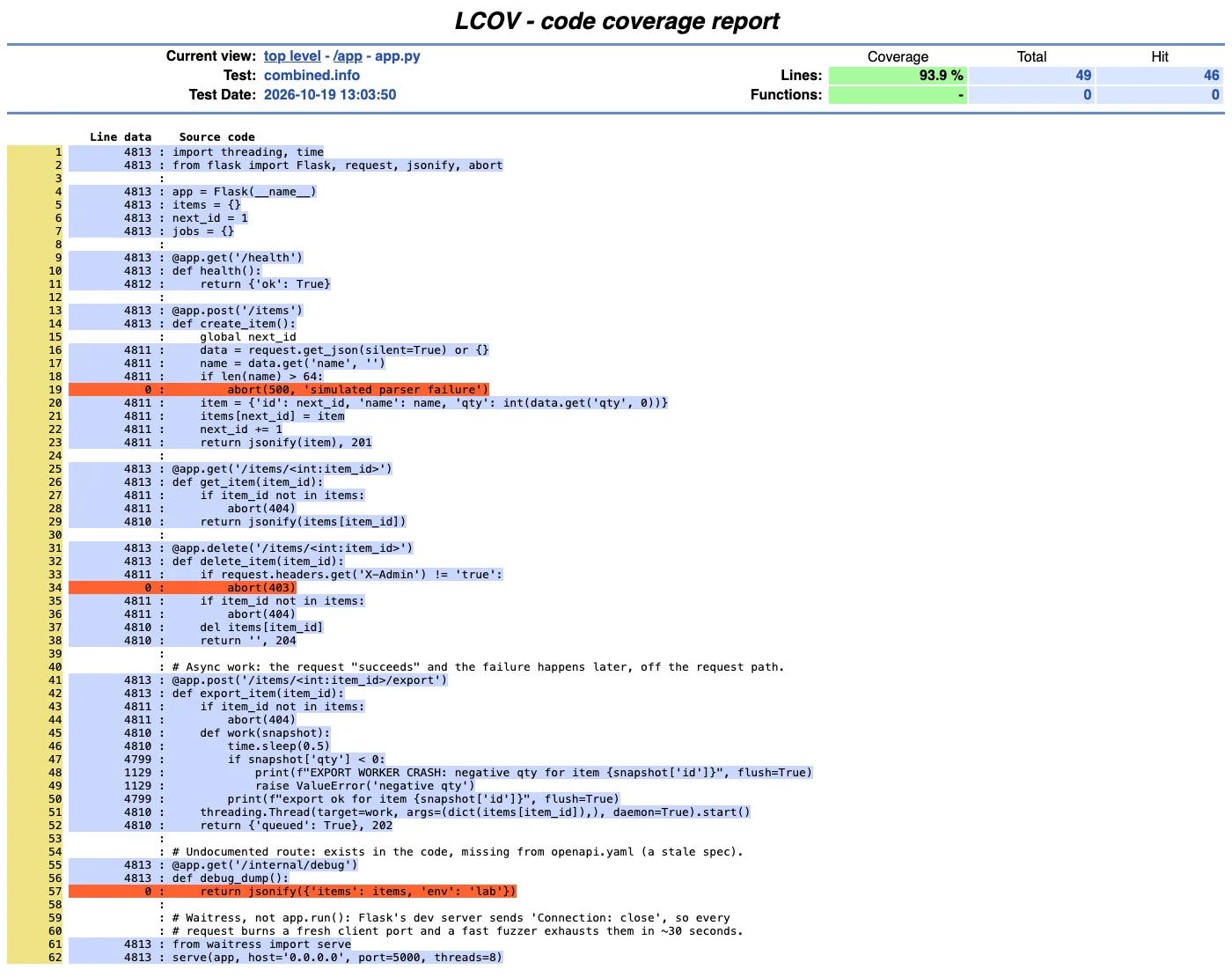
The three red lines are the whole story of this lab:
- Line 19, the planted bug, stayed red in most grey-box runs. Coverage rewards an input for reaching a new line, but it gives no hint about how to get there before anything has. That’s Reality Check 7: 94% coverage, and the crashing line is in the other 6%.
- Line 34, the 403 for non-admins, never ran in any run that used the header file, because static headers are never mutated. Supplying credentials the easy way means never testing what happens without them (Reality Check 8).
- Line 57, the undocumented debug route, never ran in any run, black-box or grey-box. A black-box fuzzer can’t tell you that: from the outside, a route that doesn’t exist and a route nobody documented look identical. The coverage report shows it as a red line no one exercised. If you attach an agent for one reason, attach it for this (Reality Check 5).
One reading note: the numbers in the left column aren’t execution counts. WuppieFuzz saves a cumulative coverage snapshot per request, and merging them sums the snapshots. “1129” next to the async crash lines means 1,129 snapshots included those lines; the worker crashed 4 times.
The async blind spot. In every black-box run, the target’s log showed the export worker crashing (EXPORT WORKER CRASH: negative qty, 18 to 48 times per run), while WuppieFuzz recorded only 202 responses for those requests. The fuzzer was the cause of every one of those crashes and had no way to know. That’s Reality Check 2, and it’s why the target’s own logs matter during a fuzzing campaign: watch them for exceptions, or set up error tracking, and match timestamps back to the fuzzer’s database.
7. Two services, one blind spot
For Reality Check 3, I built the smallest possible microservice setup (front.py, pricing.py): a front service with one documented endpoint, POST /quote, which calls a pricing service on every request. The pricing service hides a bug three conditions deep:
if qty > 100:
    total = qty * 2                      # bulk discount
    if tier == 'wholesale':
        total = qty                      # wholesale price
        if qty % 7 == 0:
            raise RuntimeError('pricing table missing for this tier')   # the hidden bug
If pricing crashes, front returns 502, which the spec doesn’t list, so WuppieFuzz would flag it. The spec even documents tier as an enum with exactly two values, retail and wholesale. fanout.sh runs a 2-minute grey-box campaign two ways:
- Agent on
front, the realistic setup: you instrument the service you’re fuzzing. Pricing runs under plain coverage.py, separately, so I can see its real coverage afterwards. - Agent on
pricing, the best case: the fuzzer gets coverage feedback from the service with the bug.
| 2 minutes each | Agent on front | Agent on pricing |
|---|---|---|
| Requests | 6,591 | 5,213 |
| Coverage the fuzzer saw | front: 11/12 lines (91%) | pricing: 14/17 lines (82%) |
| Pricing’s real coverage | 82%, lines 16-18 never ran | 82%, lines 16-18 never ran |
| Hidden bug hit | 0 | 0 |
Requests with tier: wholesale |
0 | 0 |
With the agent on front, the fuzzer saw 91% coverage and a corpus of two inputs, and had every reason to think it was nearly done. The one front line it never reached was abort(502), the line that would have fired if pricing had ever crashed. Pricing’s own coverage report showed the wholesale branch untouched.
The second run is the more surprising one. Even with direct feedback from the right service, the fuzzer never reached the bug, and the report database from that run explains why:
SELECT json_extract(CAST(body AS TEXT), '$.tier') AS tier, count(*) n FROM requests GROUP BY 1 ORDER BY 2 DESC;
tier                   n
' A�                   906
retail                 635
riiiiiiiiiiiiiiietai}  497
ret}av                 488
retai}                 475
...
The initial corpus picked retail, the first enum value, and the mutators then twisted that string into variations. Not one of roughly 12,000 requests used wholesale, the only other valid value. That’s Reality Check 6: coverage can only reward the wholesale branch after something reaches it, and nothing in the loop tried the obvious alternative. A human tester would have tried both enum values in the first minute. For your own APIs, that suggests seeding the corpus by hand: wuppiefuzz output-corpus writes the generated starting corpus to a folder of YAML files, so you can add a sequence that uses each enum value and pass it back with --initial-corpus.
8. Where the token went
Last, Reality Check 9. Every run from step 5 onward sent Authorization: Bearer lab-SECRET-token-7f3a9c. Here’s where it ended up after one 60-second black-box run:
SELECT count(*) AS requests_with_token FROM requests
WHERE CAST(data AS TEXT) LIKE '%lab-SECRET-token-7f3a9c%';
requests_with_token
316516
That’s every request in the run, in a 177 MB file. And here’s how each one is stored:
SELECT CAST(data AS TEXT) FROM requests LIMIT 1;
echo eyJuYW1lIjoiV3VwcGllRnV6eiIsInF0eSI6MH0= | \
base64 --decode | \
curl http://wf-target:5000/items? \
    --request POST \
    --header 'Authorization: Bearer lab-SECRET-token-7f3a9c' \
    --header 'accept: application/json' \
    --header 'content-type: application/json' \
    --data @-
Every request is saved as a working curl command with the credential in it. That’s a thoughtful feature for reproducing bugs and a gift to anyone who gets the file. The endpoint-coverage HTML report, the most shareable artifact a run produces, embeds the same commands as examples: the token appeared 9 times in a 9 KB page. The crash YAML files did not contain it; they store the request without authentication.
Why it matters, and when it doesn’t. Against a local container with a fake token, it doesn’t. It matters the moment the target is a shared staging environment with a real service account, because fuzzing output tends to travel: it gets uploaded as a CI artifact, attached to a ticket, dropped on a shared drive, or loaded into a Grafana dashboard several people can see. Personal data in responses lands in the same database. The formal name is CWE-312, cleartext storage of sensitive information: secrets written somewhere nobody thinks of as sensitive.
How to do better. Three habits, in order of importance:
- Fuzz with a short-lived, low-privilege token issued for the campaign and revoked afterwards. Then a leaked report holds a dead credential.
- Treat
reports/as secret in CI: don’t upload it as a public artifact, and set a retention period. - Redact before sharing. I tested this on a copy of the run’s output:
TOK=lab-SECRET-token-7f3a9c
./q.sh runs/redact <<SQL
UPDATE requests SET data = CAST(replace(CAST(data AS TEXT), '$TOK', 'REDACTED') AS BLOB)
WHERE CAST(data AS TEXT) LIKE '%$TOK%';
VACUUM;
SQL
sed -i '' "s/$TOK/REDACTED/g" runs/redact/reports/*/endpointcoverage/index.html
grep -rl "$TOK" runs/redact | wc -l
0
Searching the raw files, not just querying the database, is the important check: SQLite doesn’t promise to overwrite the space freed by an update, so a SELECT can come back clean while old bytes sit in the file. VACUUM rebuilds the database from scratch, which removes them. In my run the UPDATE alone was already enough, but I’d still run the VACUUM; it’s the step that makes the result not depend on luck.
Where this fits in a real environment
WuppieFuzz is worth running if you have an OpenAPI spec and a disposable environment you can point it at. In one minute it found the planted bug, a 64-bit integer problem I hadn’t planted, and a reflected payload, and it checked every response against the spec, a job nobody does by hand. The dedup and reproduce commands turn its output into something you can hand a developer. A short black-box run in CI against a throwaway container, with JSON error responses and a tidy spec, is a realistic first step.
The limits are mostly about what it can’t see. It only knows what the spec tells it (Reality Check 5), so the first campaign is as much a test of your spec as of your API. Plan to spend the first hour fixing response definitions, and expect a JSON-only validator to fight you if your framework returns HTML errors. It can’t see failures that happen after the response (2) or in services behind the one it calls (3), so watch logs and error tracking across the whole system while it runs. It won’t find bugs that need several specific values to line up (6) unless you seed the corpus with them. And it will create, change, and delete real data as fast as it can (8), so never aim it at an environment you can’t reset.
Coverage agents are worth attaching for the report, not for speed. On a small API they cost far more throughput than they return (4), and a high coverage number isn’t evidence of thorough testing (7). But the red lines in the report are an honest list of what nothing exercised, including routes your spec forgot. That’s a good complement to a tool like the mitmproxy harness from earlier in this series, which checks known traffic for known problems; WuppieFuzz invents the traffic. Finally, whatever environment you run it in, its reports hold your credentials in plain text (9), so issue a throwaway token and treat the output like a secret.
Actionable Takeaways
- Fix your spec before you fuzz. Declare response bodies and integer formats, and return JSON errors; in my first run, 80% of the findings were the spec’s fault.
- Deduplicate before you triage.
wuppiefuzz dedupturned 12,165 crash files into 10 clusters in 30 seconds. - Check which part of a payload mattered. The XXE-looking string crashed the API because it was long, not because it was XXE.
- Watch the target’s logs, not just the fuzzer. Background workers crashed dozens of times per run while the fuzzer saw only
202. - Use coverage reports to find what nothing touched. The red lines found an undocumented route that no black-box run could detect.
- Fuzz with a throwaway token and treat
reports/as secret. Every request is stored as a runnablecurlcommand with yourAuthorizationheader in it.
Your OpenAPI spec is a map of your attack surface; a fuzzer reads it literally, so every gap in the map becomes a gap in the testing.
